

Mind mapping is a powerful way to organize thoughts, plan projects, and explore ideas visually. Traditionally, it involved sketching ideas by hand or using basic software tools. But with the rise of AI, mind mapping has evolved into a faster, smarter, and more structured process.
Visual Paradigm offers an AI-powered approach to mind mapping that combines natural language input with formal modeling logic. This guide walks you through how to use its AI features to create structured, professional-grade mind maps quickly and efficiently.
What Is an AI-Powered Mind Map?
A mind map is a radial diagram that centers around a main idea and branches out into related subtopics. It’s ideal for brainstorming, planning, and visualizing complex information.
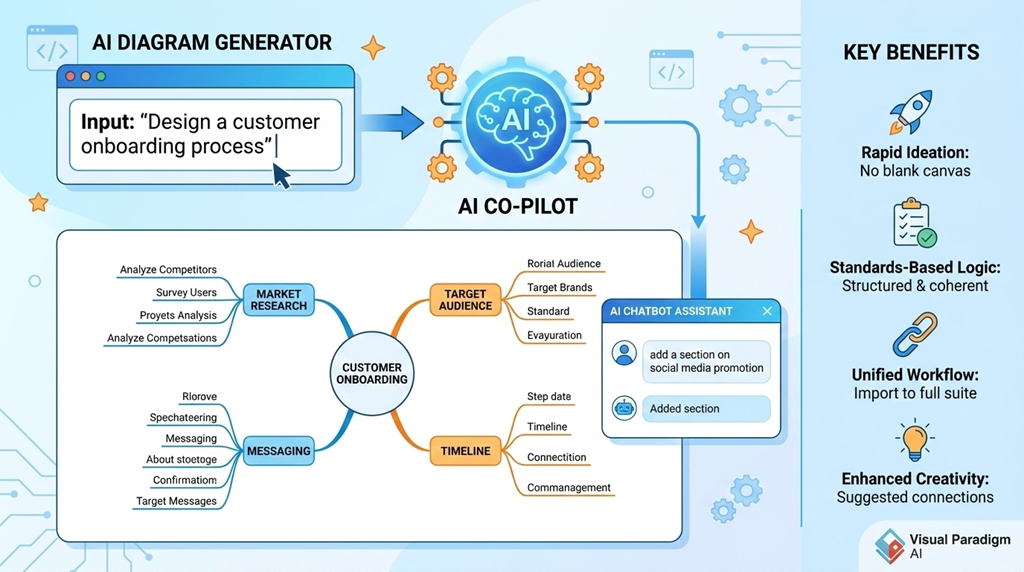
With AI integration, mind maps go beyond static visuals. Instead of starting from a blank canvas, you can input a simple prompt—like “Design a customer onboarding process”—and let AI generate a structured, hierarchical mind map in seconds. The result is a well-organized framework that reflects logical relationships, not just random associations.
Visual Paradigm’s AI ecosystem supports this by using natural language understanding and modeling standards to generate diagrams that are both intuitive and technically sound.
Key AI Features for Mind Mapping
1. AI Diagram Generator
The AI Diagram Generator takes a natural language prompt and converts it into a structured mind map. For example, entering “Create a product launch strategy” triggers the system to generate a full hierarchy including market research, target audience, messaging, timeline, and distribution.
This feature reduces the time needed to draft a mind map by up to 70%, allowing users to focus on refining rather than creating from scratch.
2. AI Chatbot Assistant
The AI Chatbot Assistant enables conversational editing. Instead of manually clicking and dragging nodes, users can ask the system to “add a section on social media promotion” or “expand the budget section.” The AI interprets the request and updates the diagram accordingly.
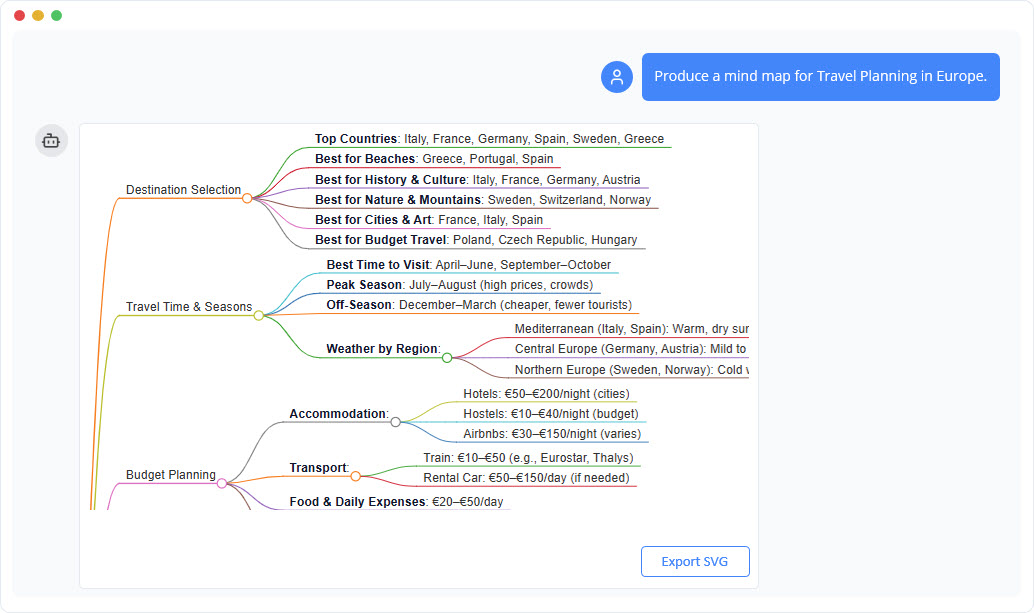
This makes the process more intuitive and dynamic, especially for users who prefer speaking over typing.
3. AI-Powered Markmap Studio
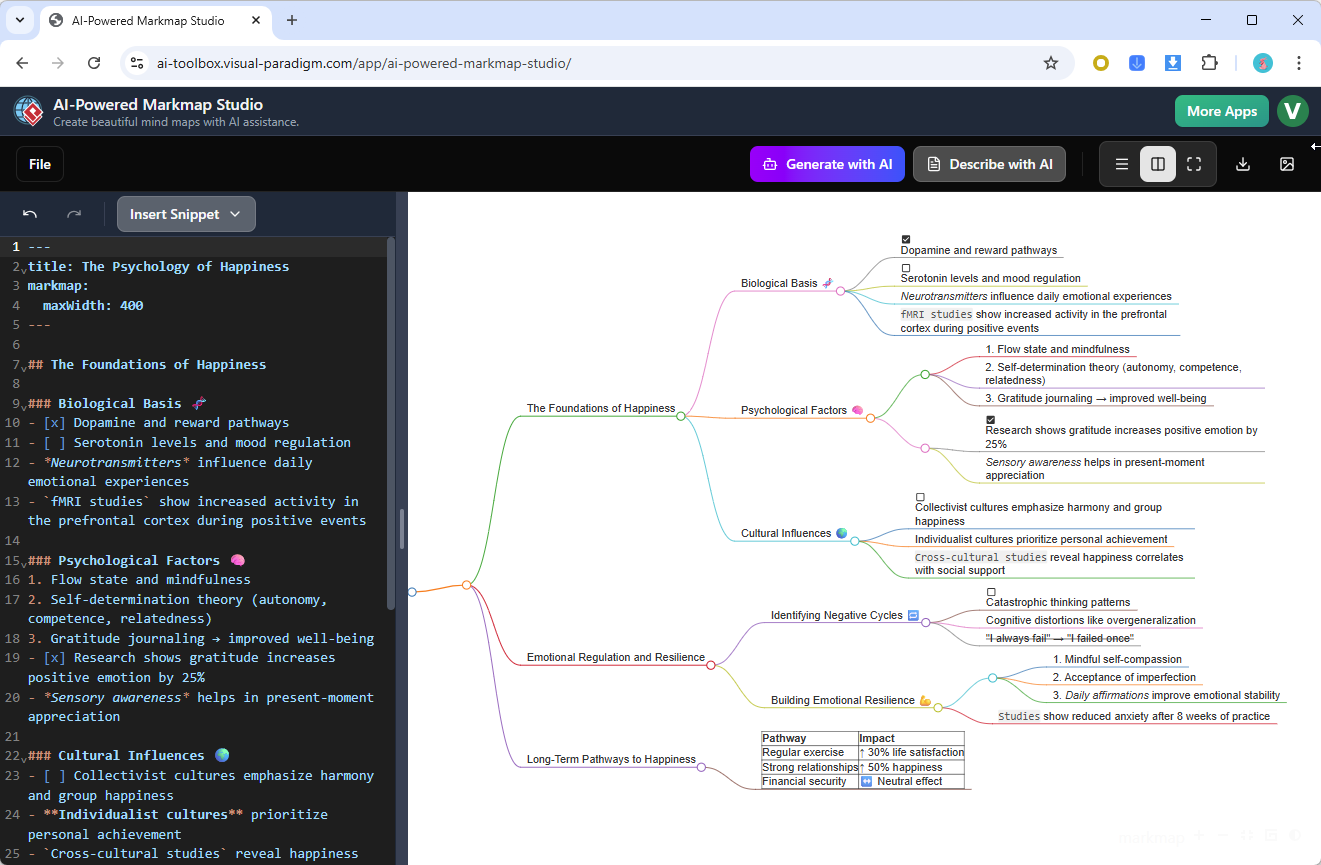
Markmap Studio blends Markdown editing with real-time AI visualization. As you write in Markdown, the AI generates a live mind map that reflects your structure. This is ideal for users who prefer text-based workflows but want visual feedback.
4. AI Interpreter
The AI Interpreter can analyze existing diagrams and convert them into structured text, such as Markdown or plain text summaries. This is useful for documentation, sharing, or integrating diagrams into reports or wikis.
It ensures that visual thinking is preserved in written form, bridging the gap between ideation and formal documentation.
Benefits of Using AI for Mind Mapping
Rapid Ideation
One of the biggest challenges in brainstorming is overcoming the blank canvas effect. AI eliminates this by generating a complete structure from a simple prompt. This jump-starts the creative process and helps users explore ideas faster.
Standards-Based Logic
Unlike generic AI tools, Visual Paradigm applies formal modeling principles. The generated mind maps follow logical structures, ensuring that relationships between ideas are meaningful and coherent.
This is especially important for business, technical, or academic use cases where clarity and consistency matter.
Unified Workflow
AI-generated mind maps are not just static images. They can be imported into Visual Paradigm’s full suite—both desktop and online—for further refinement, analysis, or integration with other diagrams like UML or BPMN.
This creates a seamless workflow from ideation to implementation.
Enhanced Creativity
AI doesn’t just follow instructions—it suggests connections and subtopics that users might not have considered. For example, after inputting “Plan a remote team strategy,” the AI might suggest sections on asynchronous communication, team culture, and productivity tools.
This acts like a brainstorming partner, helping users explore ideas they hadn’t thought of.
Versatile Exporting
Once complete, mind maps can be exported in multiple formats: JSON, Markdown, PNG, SVG, and more. This makes them easy to share, embed in presentations, or integrate into documentation systems.
Getting Started: How to Generate Your First Mind Map
To create your first AI-powered mind map, follow these steps:
- Go to the AI Mind Map Tool
Visit Free AI Mind Map Tool – Visual Paradigm AI to access the platform. - Enter a Prompt
Type a clear, concise statement such as “Outline a digital marketing campaign” or “Plan a software development roadmap.” - Review the Generated Map
The AI will generate a hierarchical mind map within seconds. The structure will include main branches and subtopics based on your input. - Refine with the AI Chatbot
Use the chat interface to add, remove, or reorganize sections. For example, ask, “Add a section on influencer partnerships.” - Edit with Markmap Studio (Optional)
If you prefer text-based editing, switch to Markmap Studio. Write your outline in Markdown, and watch the mind map update in real time. - Export or Import
Once satisfied, export the map to your preferred format or import it into Visual Paradigm’s desktop or online tools for further analysis.
Conclusion
AI-enhanced mind mapping transforms the way we organize ideas. By combining natural language input with structured modeling logic, tools like Visual Paradigm’s AI ecosystem make the process faster, more accurate, and more creative.
Whether you’re planning a project, designing a system, or brainstorming a new product, AI-powered mind maps help you visualize complex ideas clearly and efficiently.
References
- Visual Paradigm: Business and IT Transformation Platform: A leading software suite for enterprise architecture, business process modeling, agile development, and project management, trusted by over 320,000 users worldwide to improve agility and manage complexity.
- AI Text-to-Mind Map Generation in Visual Paradigm: Explains how Visual Paradigm’s AI tools convert natural language descriptions or Markdown into structured, editable mind maps for faster brainstorming, planning, and documentation.
- AI-Powered Markmap Studio: Markdown to Interactive Mind Maps: A specialized AI tool that instantly transforms Markdown notes or text prompts into visual mind maps, with live editing, customizable depth, real-time previews, and easy SVG export.
- AI-Assisted Brainstorming in Visual Paradigm: Turns natural language prompts into structured, editable mind maps to accelerate idea generation, improve clarity, and streamline workflows with export options to JSON or Markdown.
- Mind Mapping Tools and Features – Visual Paradigm: Comprehensive mind mapping capabilities including branching structures, connectors, icons, automatic coloring, hotkey support, and AI-powered generation from concepts or notes.
- What Sets Visual Paradigm’s AI Chatbot Apart for Diagram Creation: Highlights the chatbot’s training on formal modeling standards (UML, SysML, ArchiMate) for valid, high-quality diagrams, plus contextual editing and iterative refinements in a unified workspace.
- Review: Visual Paradigm’s AI Diagram Generation Capabilities: Third-party analysis of AI tools that convert text prompts into standards-compliant UML, BPMN, ArchiMate, and SysML diagrams, with refinement, quality checks, and conversational assistance for efficient modeling.
- Boosting Creativity and Productivity with AI-Powered Mind Maps: Details how AI suggests expansions, builds instant structure, and enables effortless refinement to enhance brainstorming, planning, and collaboration without advanced design skills.
- Visual Paradigm Online: Cloud-Based Productivity Suite: Access the fully online version for diagramming, AI features, document editing, spreadsheets, presentations, PDF tools, and more, all in a browser-based environment.