

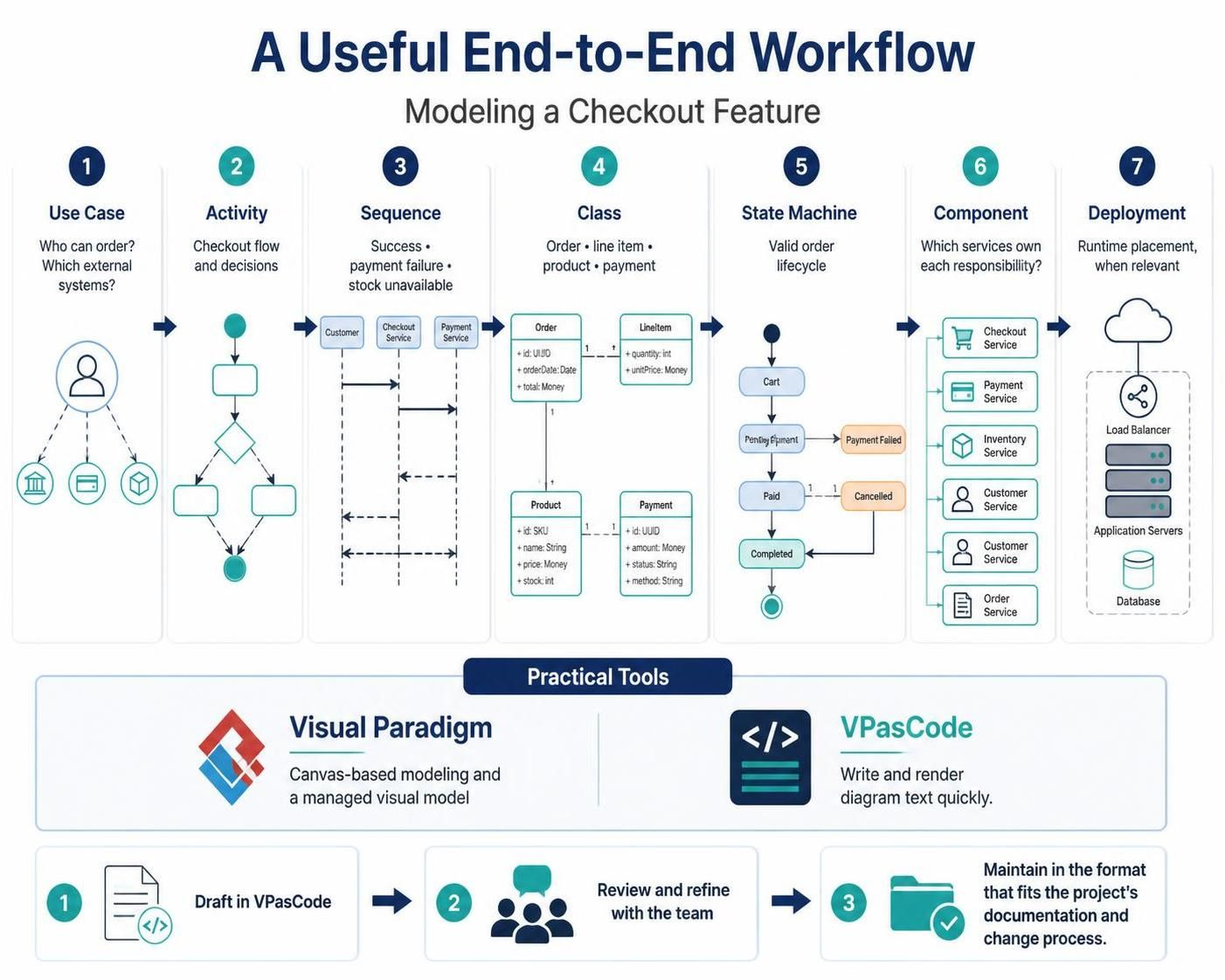
Designing complex software features like an online checkout system requires more than just writing code; it requires a structured approach to understanding the system’s behavior, structure, and architecture. This tutorial walks you through a powerful, seven-step modeling workflow designed to take a feature from a vague requirement to a fully documented architectural plan.
This workflow leverages the capabilities of Visual Paradigm and VPasCode, combining the visual intuition of canvas-based modeling with the speed of text-based diagram generation.
The Seven-Step Modeling Workflow
When tackling a “checkout” feature, a robust architecture team will often cycle through seven distinct modeling views. Each view answers a specific question about the system.
1. Use Case: The “Who” and “What”
The process begins at a high level. Before drawing any lines or boxes, you must define the scope of the feature. The Use Case diagram identifies the actors (who can place an order) and the external systems involved (e.g., a credit card processor or inventory database).
- Focus: External interactions and boundaries.
- Goal: Define who participates and what high-level goals they achieve.
2. Activity: The “How” (Flow)
Once the actors are identified, we map the journey. The Activity diagram visualizes the flow of control. It looks at the logical steps from the moment a user initiates checkout until the final confirmation, including decision points (diamonds) where the flow branches based on conditions.
- Focus: Business logic and process flow.
- Goal: Map the checkout flow and its critical decisions.
3. Sequence: The “When” (Timing)
As the flow gets complex, you need to understand the timing of interactions. The Sequence diagram details the specific messages passed between objects over time. Crucially, this view should detail multiple paths:
- Success Path: The happy flow where everything works.
- Payment Failure Path: How the system handles a declined card.
- Stock Unavailable Path: How the system handles out-of-stock items.
4. Class: The “Data” (Structure)
Behind every action is data. The Class diagram defines the static structure of the system. For a checkout feature, you must define the core concepts and their relationships:
- Order: The container for the transaction.
- Line Item: The individual products within the order.
- Product: The catalog item with price and stock info.
- Payment: The record of the financial transaction.
5. State Machine: The “Lifecycle”
Objects have a life cycle. A State Machine diagram is essential for tracking the lifecycle of the Order. It defines exactly what states an order can be in (e.g., Cart, Pending Payment, Paid, Cancelled) and what events trigger the transition from one state to another.
6. Component: The “Where” (Responsibility)
Now we move to the architectural level. The Component diagram groups the system into logical modules or services. It answers the question: “Which service owns which responsibility?” This might include a Checkout Service, a Payment Service, an Inventory Service, and an Order Service.
7. Deployment: The “Runtime” (Infrastructure)
Finally, the Deployment diagram documents the physical or cloud infrastructure. It maps the software components to hardware nodes, such as Load Balancers, Application Servers, and Databases, ensuring the architecture matches the deployment environment.
Practical Tooling: Visual Paradigm vs. VPasCode
To execute this workflow efficiently, teams often choose between two approaches depending on the project phase.
Visual Paradigm is ideal for the “Canvas-based modeling” phase. It allows for drag-and-drop interaction, making it perfect for collaborative workshops where teams want to see a “managed visual model” evolve in real-time.
VPasCode is the tool of choice for developers who prefer writing and rendering diagram text quickly. It allows for rapid prototyping of scenarios without the overhead of manual layout adjustments.
The Best Practice Workflow: A common approach is to draft a scenario in VPasCode to get the logic right quickly, review and refine it with the team, and then maintain the final diagrams in the format that best fits the project’s documentation standards.
Step-by-Step Implementation Example
Let’s look at how you might define the Class and Sequence aspects of this workflow using code-like syntax.
Defining the Class Structure
Using a text-based definition, you can specify the attributes of your core entities:
class Order {
  + id: UUID
  + orderDate: Date
  + total: Money
}

class LineItem {
  + quantity: Int
  + unitPrice: Money
}

class Product {
  + id: SKU
  + name: String
  + price: Money
  + stock: Int
}

class Payment {
  + id: UUID
  + amount: Money
  + status: String
  + method: String
}

Order "1" --> "1..*" LineItem
LineItem "1" --> "1" Product
Order "1" --> "1" Payment
Defining the Sequence Logic
For the sequence diagram, you would define the interaction between the Customer, the Checkout Service, and the Payment Service, handling the success and failure paths:
actor Customer
participant "Checkout Service" as Checkout
participant "Payment Service" as Payment

Customer -> Checkout: Initiate Checkout
Checkout -> Checkout: Validate Stock
Checkout -> Payment: Process Payment

alt Payment Success
  Payment --> Checkout: Success
  Checkout --> Customer: Order Confirmed
else Payment Failed
  Payment --> Checkout: Declined
  Checkout --> Customer: Payment Error
end