

Introduction: Why I Finally Took the Time to Learn BPMN (And Why You Should Too)
Like many business analysts and process improvement professionals, I spent years struggling with vague flowcharts, inconsistent documentation, and communication gaps between business stakeholders and technical teams. I’d heard about BPMN—Business Process Model and Notation—but honestly, I assumed it was just another complex modeling standard reserved for enterprise architects.
That changed when I joined a digital transformation project where misaligned process documentation was causing costly delays. A colleague introduced me to BPMN 2.0, and what started as a reluctant learning exercise became one of the most valuable professional investments I’ve made. This guide shares my hands-on experience navigating BPMN fundamentals, practical notation elements, and the tools that made the difference—all from the perspective of someone who’s been in your shoes.
What BPMN Actually Is (From Someone Who Finally “Got It”)
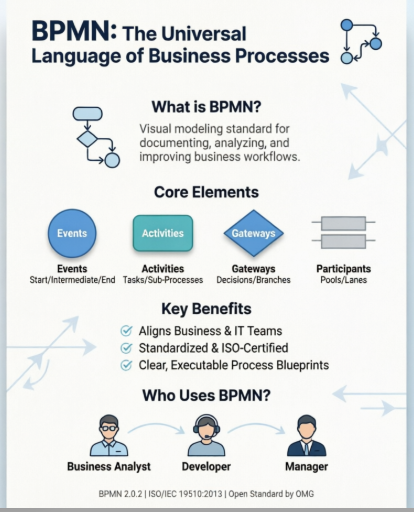
When I first encountered BPMN, the official definition felt overwhelming: “a visual modeling language for business analysis applications and specifying enterprise process workflows.” But in practice? It’s simply a universal visual language that lets everyone—from frontline staff to CTOs—look at the same diagram and understand how work actually flows through an organization.
What clicked for me was realizing BPMN isn’t about creating pretty pictures. It’s about creating precise, executable blueprints that bridge the gap between “what the business needs” and “what IT builds.” The standardized symbols mean a gateway in New York means the same thing as a gateway in Tokyo—no more guessing games.
A Quick History Lesson (That Actually Matters)
Understanding BPMN’s background helped me appreciate why it works so well:
-
2004: Originally published by the Business Process Management Initiative (BPMI)
-
2005: BPMI merged with the Object Management Group (OMG), which now maintains the standard
-
2006: First OMG BPMN specification released
-
2010: BPMN 2.0 introduced major enhancements for execution semantics
-
2013: BPMN 2.0.2 formally published as ISO/IEC 19510:2013
This evolution matters because it means BPMN isn’t a vendor-specific tool—it’s an open, internationally recognized standard. When I document a process using BPMN today, I know that diagram will remain understandable and usable years from now, regardless of which software tool my team adopts next.
Why BPMN Changed My Workflow (The Real Benefits)
After six months of using BPMN consistently, here’s what I noticed:
✅ Stakeholder alignment improved dramatically. Business users could finally read our process diagrams without needing a translator.
✅ Requirements gathering became faster. Instead of lengthy textual descriptions, we could sketch a BPMN diagram in a workshop and get immediate feedback.
✅ Handoffs to development teams got smoother. Because BPMN 2.0 supports execution semantics, developers could see exactly how processes should behave.
✅ Process optimization became data-driven. With clear visualizations, bottlenecks jumped off the page.
The standard delivers on its promises:
-
Industry-backed by the OMG consortium (not-for-profit, so no vendor lock-in)
-
Provides businesses with the capability to define and understand procedures through Business Process Diagrams
-
Offers notation readily understandable by all business stakeholders
-
Bridges the communication gap between business process design and implementation
-
Simple to learn yet powerful enough to depict complex business logic
Who Actually Uses BPMN? (Spoiler: It’s More People Than You Think)
In my experience, BPMN serves three core audiences—and I’ve worn all three hats:
🔹 Technical experts responsible for process implementation (who need precise, executable models)
🔹 Business analysts who create and improve processes (who need clarity and stakeholder buy-in)
🔹 Managers who monitor and control processes (who need visibility and metrics)
What’s powerful is that one BPMN diagram can serve all three groups simultaneously. No more maintaining separate documentation for business vs. IT.
Getting Started: The Core Building Blocks I Use Daily
Swimlanes: Mapping Who Does What

Swimlanes were my “aha!” moment. These graphical containers represent participants in a process. I use them to answer the critical question: Who is responsible for this step?
There are two types:
-
Pools: Represent major participants (e.g., Customer, Accounting Department, Payment Gateway)
-
Lanes: Sub-partitions within a pool (e.g., within “Accounting,” you might have “Accounts Payable” and “Accounts Receivable” lanes)
Pro tip from my experience: Don’t over-engineer lanes to mirror your org chart. BPMN is for modeling process flow, not organizational structure. Save org charts for… well, org charts.

I frequently use “black box” pools for external entities. If I’m modeling an internal approval workflow, the Customer pool might be a black box—their internal process isn’t relevant to my diagram. But if I switch perspectives to model the customer journey? Suddenly that black box becomes a detailed pool. Flexibility like this is why BPMN scales.
Flow Elements: The Heartbeat of Your Process

These three elements define what actually happens in your process:
🎯 Events (Circles)
Something that happens and impacts the process. I categorize them as:
-
Start Event: Where the process begins (e.g., “Order Received”)
-
Intermediate Event: Something that occurs during the process (e.g., “Payment Confirmed”)
-
End Event: Where the process completes (e.g., “Order Shipped”)

In practice, I always start diagramming by placing my start and end events first. It creates natural boundaries and keeps me focused.
⚙️ Activities (Rounded Rectangles)
Work that gets performed. I distinguish between:
-
Tasks: Atomic actions that don’t need further breakdown (e.g., “Send Confirmation Email”)
-
Sub-Processes: Complex activities that can be “drilled into” for more detail

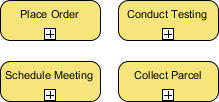
My rule of thumb: If explaining the step takes more than two sentences, it’s probably a sub-process worth expanding later.
🔀 Gateways (Diamonds)
Decision points that control flow. These transformed how I model business rules:
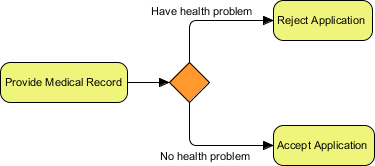
Exclusive Gateway: Only one path is taken based on conditions (e.g., “Is customer VIP?”)

Inclusive Gateway: Multiple paths can be taken if conditions are met

Parallel Gateway: All outgoing paths execute simultaneously (no conditions)

Event-Based Gateway: Path depends on which event occurs first (e.g., customer reply: Yes/No)
I used to misuse gateways constantly. Now I ask: “Is this a data-based decision, a parallel execution, or an event-driven choice?” That simple question prevents 90% of modeling errors.
Connecting the Dots: Flows That Make Sense

➡️ Sequence Flows (Solid Lines)
Show the order of activities within the same pool. Critical rule I learned the hard way: Never use sequence flows between pools. That’s what message flows are for.

✉️ Message Flows (Dotted Lines)
Represent communication between pools (e.g., email, API call, phone call).
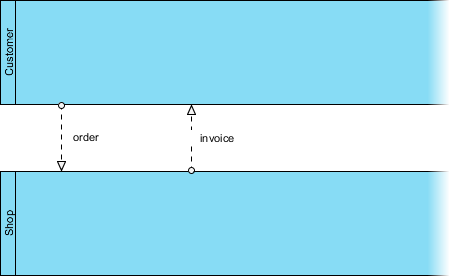
Mixing these up was my most common beginner mistake. Now I color-code them in my notes: blue for sequence (internal flow), green for message (external communication).
Data, Annotations, and Groups: The Supporting Cast

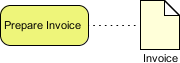
Data objects help me track what information is created, used, or stored. I especially appreciate being able to show data inputs/outputs for activities—it makes integration points crystal clear.

Groups (dotted boxes) help me visually cluster related elements without affecting flow logic

Text annotations let me add context without cluttering the main flow—perfect for compliance notes or business rules
Real-World Example: How I Modeled a Water Delivery Process

When True Aqua Distilled Water Company asked me to optimize their ordering process, I started with this BPMN diagram. Here’s what worked:
-
Two pools: Customer (black box) and True Aqua (detailed lanes for Customer Service and Logistics)
-
Clear start event: “Order Received via Phone/Email”
-
Exclusive gateway: “Is customer new?” → creates account if yes
-
Parallel flow: Order processing AND delivery scheduling happen concurrently
-
Message flows: Show communication between customer and company
The visual clarity helped stakeholders immediately spot inefficiencies—like the manual handoff between departments that was causing Wednesday delivery delays. We redesigned the process in the diagram first, then implemented changes with confidence.
The Tool That Made BPMN Click for Me: Visual Paradigm
After trying several modeling tools, Visual Paradigm became my go-to for BPMN work. Here’s why it resonated with my workflow:
BPMN Business Process Diagram

The intuitive drag-and-drop interface meant I spent time modeling processes, not fighting the tool. Full BPMN 2.0.2 support ensured my diagrams were standards-compliant.
Process Drill-Down

Being able to “open up” a sub-process into its own detailed diagram—and collapse it back for high-level views—solved my biggest pain point: balancing detail with readability.
Map with Any Standards

I loved that I could embed UML classes, ERD entities, or wireframes directly into my BPMN diagrams. No more context-switching between tools.
Working Procedure Editor

While the BPD gave the bird’s-eye view, the procedure editor let me attach step-by-step instructions to individual activities. Perfect for training docs or compliance audits.
As-Is and To-Be Modeling

Documenting current processes (As-Is) and designing future states (To-Be) in the same environment—with traceability between them—made change management so much smoother.
RACI & CRUD Charts

Generating RACI charts directly from my BPMN diagrams saved hours of manual matrix building. Automatically assigning “Responsible” roles based on swimlanes? Genius.
Process Animation & Simulation


Animating my process flows helped stakeholders see bottlenecks. Simulation features let me test resource allocation and cost scenarios before implementing changes. Huge risk reducer.
💡 My honest take: The advanced features (animation, simulation, RACI generation) require Standard/Professional/Enterprise editions. But even the free tier offers enough BPMN 2.0 support to get started and learn the notation properly.
Lessons Learned: What I Wish I’d Known Sooner
-
Start simple. Don’t try to model every exception on day one. Get the happy path right first.
-
Consistency beats completeness. A slightly incomplete but consistently styled diagram is more useful than a “perfect” messy one.
-
Involve stakeholders early. BPMN’s visual nature makes it perfect for collaborative workshops—use that advantage.
-
Validate as you go. Tools with built-in BPMN syntax checking catch errors before they become costly misunderstandings.
-
Think executable. Even if you’re not automating the process today, modeling with execution in mind future-proofs your work.
Conclusion: Why BPMN Earned a Permanent Spot in My Toolkit
Looking back, learning BPMN wasn’t just about mastering a notation—it was about adopting a mindset. A mindset where clarity, collaboration, and precision drive process improvement.
What started as a project requirement became a professional superpower. Today, whether I’m onboarding a new team member, presenting to executives, or collaborating with developers, BPMN diagrams are my universal translator. They turn abstract workflows into shared understanding.
If you’re on the fence about investing time in BPMN: do it. Start with the core elements (events, activities, gateways, flows), practice with a real process you know well, and use a supportive tool like Visual Paradigm to reduce the learning curve. The initial effort pays dividends in reduced rework, faster alignment, and more successful process outcomes.
Most importantly, remember: BPMN isn’t about creating perfect diagrams. It’s about creating shared understanding. And in a world of complex business processes, that’s invaluable.
References
- Professional BPMN process modeling tool: Comprehensive overview of Visual Paradigm’s BPMN 2.0 diagramming capabilities, including drag-and-drop modeling, validation, and export features.
- Process Design Tool: Details on end-to-end process design workflows, from discovery to implementation support.
- BPMN Guide: Official tutorial series covering BPMN notation, best practices, and practical modeling techniques.
- Professional Guide: Mastering BPMN with Visual Paradigm: In-depth walkthrough of using Visual Paradigm for BPMN from initial concept through executable model generation.
- BPMN Tools Solution: Business-focused overview of how BPMN tools drive process improvement, compliance, and digital transformation.
- BPMN Tutorial: Step-by-step beginner tutorial for creating your first BPMN diagram.
- Visual Paradigm: The Ultimate All-in-One Software: Blog post highlighting Visual Paradigm’s integrated approach to software and process modeling.
- Introduction to BPMN Using Visual Paradigm: Practical introduction connecting BPMN modeling to broader enterprise architecture practices.
- BPMN Made Easy: Simplified approach to adopting BPMN for teams new to process modeling.
- Business Process Modeling Solution: Enterprise-grade process modeling capabilities including collaboration, versioning, and governance features.
- Visual Paradigm User Guide: BPMN: Detailed technical reference for BPMN features and configuration options.
- BPMN Notation Overview: Complete reference of BPMN 2.0.2 elements, symbols, and usage guidelines.
- Desktop and Online Accessibility: Information on deployment options including desktop (Windows/macOS/Linux) and cloud-based web access.