

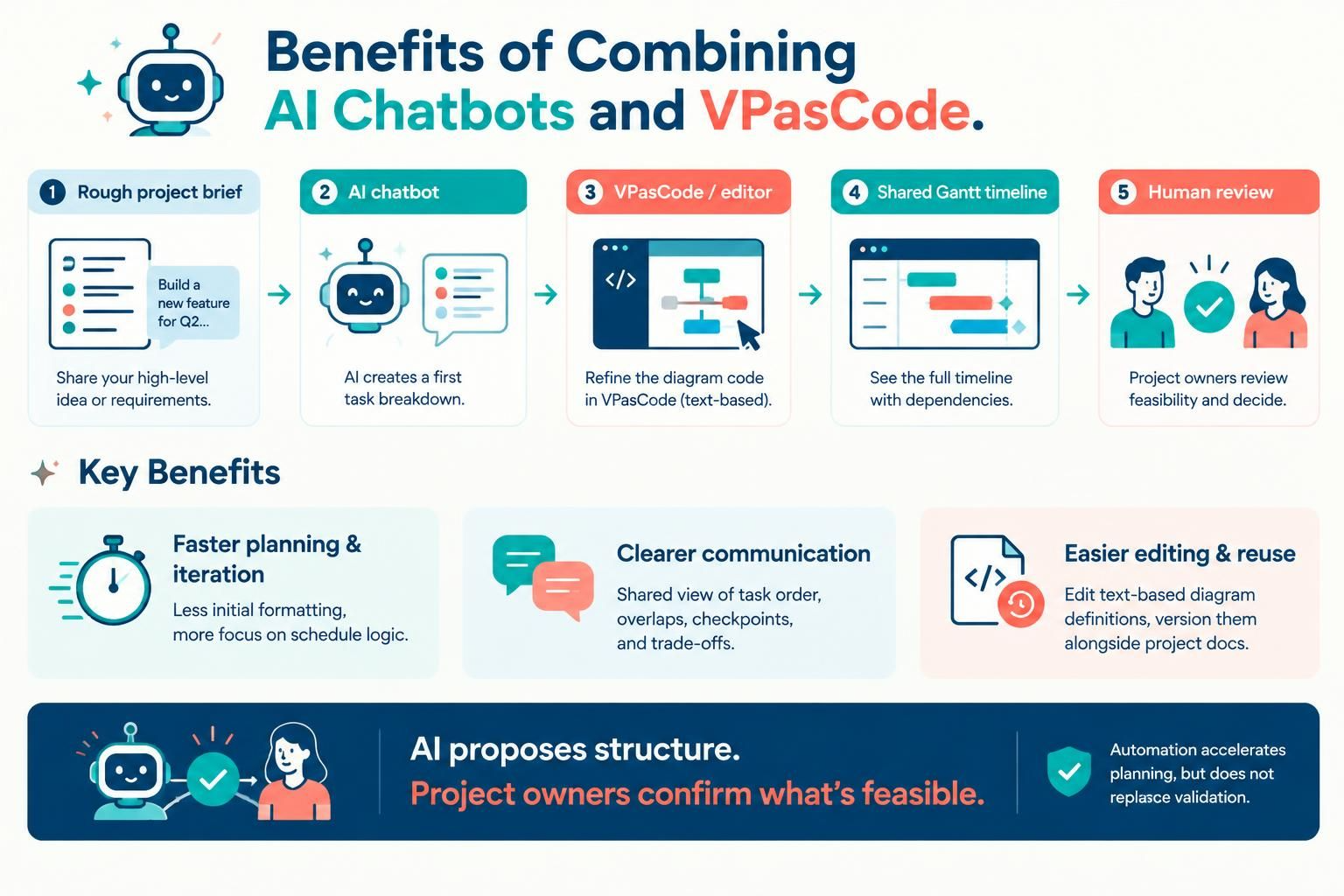
In modern project management, the gap between a high-level idea and a detailed schedule can be bridged efficiently using a hybrid workflow. By combining the creative speed of AI chatbots with the precision of VPasCode (Visual Paradigm as Code), teams can accelerate planning while maintaining rigorous control over task logic.
This tutorial explores the architecture of this workflow, explaining how to transform a rough project brief into a maintainable, text-based Gantt chart using the Visual Paradigm ecosystem.
The AI-Driven Planning Architecture
The most effective project planning systems utilize a “Human-in-the-Loop” approach. Rather than replacing human judgment, AI acts as a force multiplier for the initial breakdown of work. The workflow typically follows a five-step architecture:
- Rough Project Brief: The process begins with a high-level concept, such as “Build a new feature for Q2.” This provides the context but lacks technical detail.
- AI Chatbot Processing: An AI assistant analyzes the brief and generates a first-pass task breakdown. It identifies potential milestones and logical groupings.
- VPasCode Refinement: The generated text is converted into
VPasCode(PlantUML-based syntax). An editor refines this code, ensuring dependencies and dates are accurately represented. - Shared Gantt Timeline: The code is rendered into a visual timeline. This creates a shared view for stakeholders, highlighting overlaps and critical checkpoints.
- Human Review: Project owners verify the feasibility of the schedule. AI proposes the structure, but humans confirm what is realistic.
Why Text-Based Diagrams Matter
Traditional Gantt charts are often static images or complex spreadsheets that are difficult to version control. By using VPasCode, the diagram definition becomes text. This offers three distinct advantages:
- Faster Iteration: You can generate a first draft instantly, saving time on initial formatting.
- Clearer Communication: A well-labeled chart makes discussing trade-offs easier than reading paragraphs of text.
- Version Control: Because the definition is text, it can be reviewed, diffed, and versioned alongside project documentation.
Key Concepts: Modeling the Schedule
To utilize the Visual Paradigm Gantt Chat Tool and VPasCode effectively, you must understand the underlying modeling concepts. The goal is to move from a linear list of tasks to a network of dependencies.
1. The Source of Truth
For complex projects, the detailed task register (a database or spreadsheet) should remain the authoritative source. The Gantt chart generated via VPasCode acts as a view of that data. This separation of concerns ensures that the visual representation stays synchronized with the actual data.
2. Maintainability and Structure
When writing VPasCode, clarity is paramount. You should use short, consistent task names and stable identifiers. Group related work into sections to keep the diagram organized. If a schedule becomes too complex, split it into phases or create a high-level roadmap alongside a detailed team-level chart.
Best Practices and Common Pitfalls
Using AI to generate diagrams is powerful, but it requires strict validation to prevent logical errors. Below are the critical best practices to follow when refining AI-generated schedules.
Writing Effective Prompts
The quality of the output depends heavily on the input. When interacting with the AI assistant:
- Define the Scope: Provide a deadline, known constraints, and the required output format.
- Ask for Assumptions: Instruct the AI to identify missing information and label estimates as assumptions.
- Limit Inventiveness: Avoid asking the AI to invent owners or durations unless you explicitly want sample values.
Validating Dates and Dependencies
Even if a diagram renders successfully, it may contain impossible logic. You must manually verify the following:
- Time Context: Confirm the year, time zone, workweek, and holidays. Ensure you know if duration is measured in working days or calendar days.
- Predecessor Relationships: Check every link. If a task depends on a prerequisite, ensure the start date reflects the end of that prerequisite.
- Milestone Dependencies: If a launch milestone depends on multiple deliverables, verify that all prerequisites are completed before the milestone date.
Maintainable Code Examples
When refining the diagram code in VPasCode, keep the source file with your project documentation. Here is an example of how to structure a maintainable Gantt chart definition:
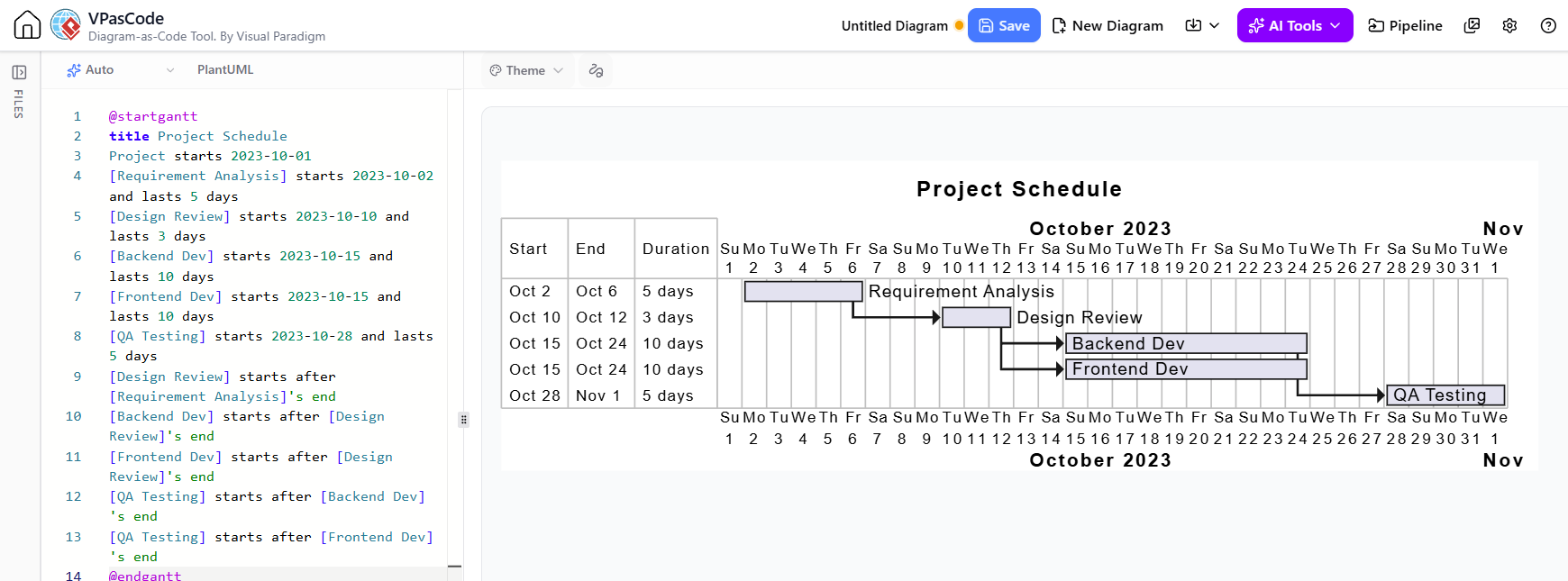
@startgantt
title Project Schedule
Project starts 2023-10-01
[Requirement Analysis] starts 2023-10-02 and lasts 5 days
[Design Review] starts 2023-10-10 and lasts 3 days
[Backend Dev] starts 2023-10-15 and lasts 10 days
[Frontend Dev] starts 2023-10-15 and lasts 10 days
[QA Testing] starts 2023-10-28 and lasts 5 days
[Design Review] starts after [Requirement Analysis]'s end
[Backend Dev] starts after [Design Review]'s end
[Frontend Dev] starts after [Design Review]'s end
[QA Testing] starts after [Backend Dev]'s end
[QA Testing] starts after [Frontend Dev]'s end
@endganttConclusion
The combination of AI Chatbots and VPasCode represents the future of project planning. It accelerates the process by automating the creation of structure, but it relies on the human owner to validate feasibility. By adhering to these best practices and keeping your diagrams maintainable, you can ensure your project schedule is both a visual masterpiece and a robust tool for execution.