

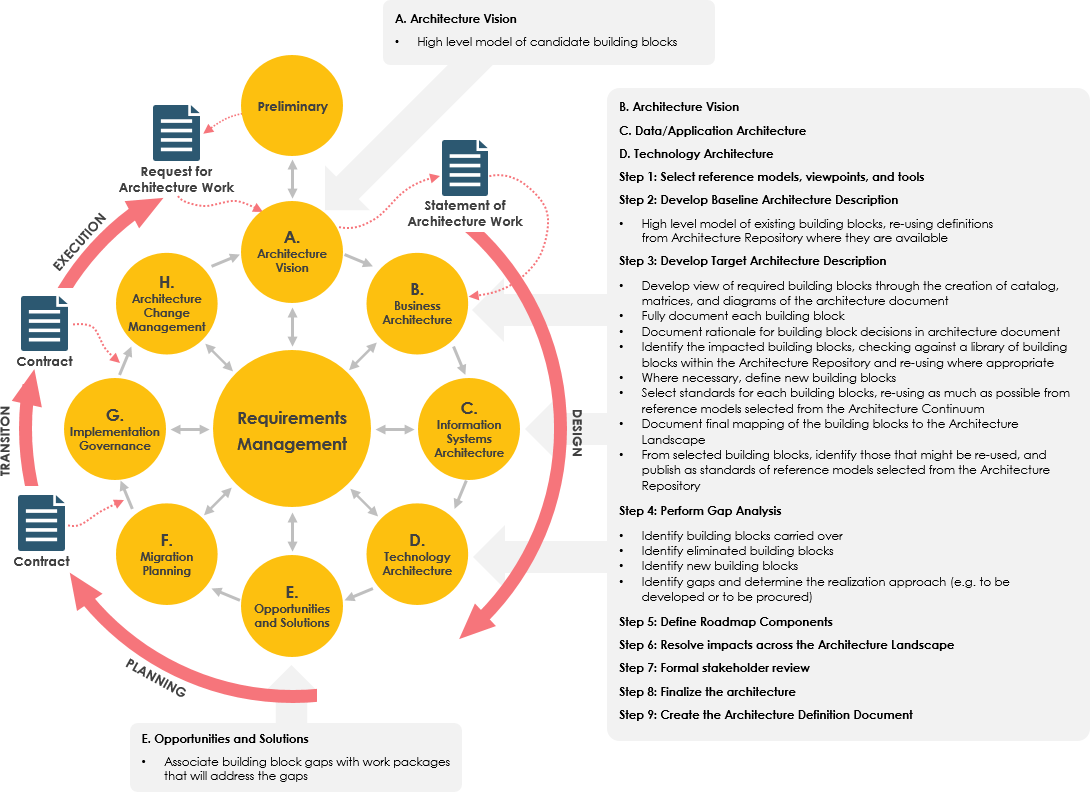
In the complex world of Enterprise Architecture (EA), bridging the gap between high-level strategy and technical implementation is a constant challenge. This tutorial explores a modern, “Architecture as Code” approach using the VPasCode tool integrated with the ArchiMate modeling language. Unlike traditional drag-and-drop interfaces, this method emphasizes precision, version control, and automated consistency checks.
We will walk through the architectural lifecycle shown in the diagram, transitioning from a “Preliminary” phase to “Requirements Management” and finally to “Architecture Vision.”
1. The Preliminary Phase: Setting the Stage
Every successful EA project begins with the Preliminary phase. This is the “setup” stage where the organization defines the scope, principles, and governance required to run the architecture program. In the context of VPasCode, this is where you initialize your project structure.
Instead of manually creating a blank canvas, you define the architectural vision in a configuration file. This ensures that all subsequent models adhere to a standardized taxonomy from day one.
Key Activities in the Preliminary Phase
- Define Scope: Determine which parts of the business are in scope for the architecture.
- Establish Principles: Create the “rules of the road” (e.g., “All data must be centralized”).
- Set Up the Repository: Initialize the VPasCode environment to store your models.
2. Architecture Vision: The High-Level Blueprint
Once the groundwork is laid, the team moves to Architecture Vision. As depicted in the diagram, this involves creating a “High level model of candidate building blocks.” This is the strategic overview that stakeholders will use to understand the future state of the enterprise.
Using VPasCode, you can define these building blocks programmatically. For instance, you might define a generic “Customer Service” application and link it to a specific business process.
Step 1: Define the Vision in VPasCode
Here is how you might define the core components of your Architecture Vision using the ArchiMate syntax supported by VPasCode.
// Define the Application Layer
Application: CRM_System {
  type: ApplicationService
  description: "Manages customer interactions and data"
}

Application: ERP_System {
  type: ApplicationService
  description: "Core enterprise resource planning"
}

// Define the Business Layer
BusinessProcess: Order_Management {
  type: BusinessProcess
  description: "Handles the flow of customer orders"
}

// Establish the Relationship
// Linking the Business Process to the Application that supports it
BusinessProcess "Order_Management" -> Application "CRM_System" : "Supports"
This code snippet demonstrates the “Architecture as Code” philosophy. By defining the Application layer and the Business Process layer, and then explicitly connecting them, you create a rigorous model that is easier to validate than a hand-drawn diagram.
3. Requirements Management: The Central Hub
The diagram highlights Requirements Management as the central node, connecting to all other layers including Business, Information, and Technology architectures. This signifies that every architectural decision must be traceable back to a specific business requirement.
In VPasCode, this is handled through a requirements matrix or a linked list of constraints. If a requirement changes, the impact on the architecture is automatically calculated.
Implementing Traceability
To ensure your Architecture Vision remains aligned with business needs, you define requirements at the start of the modeling process.
Requirement: REQ_001 {
  id: "REQ_001"
  text: "System must support real-time data synchronization"
  priority: "High"
  type: FunctionalRequirement
}

// Link Requirement to Architecture Element
Requirement "REQ_001" -> Application "CRM_System" : "Satisfies"
By using this syntax, you create an unbroken chain of logic: from the requirement (REQ001) to the specific application (CRMSystem). This is crucial for compliance and auditing.
4. Architecture Vision & Design: The Output
The final output of this phase is the Statement of Architecture Work. This document serves as the contract between the architecture team and the business stakeholders. It outlines the “What” and the “How” of the proposed solution.
VPasCode automates the generation of this statement. It compiles the code snippets, the definitions of building blocks, and the relationships into a formal report that can be reviewed and approved.
The Role of the “Contract”
The diagram shows a “Contract” document. In the VPasCode workflow, this is generated automatically once the model passes validation. It ensures that the “High level model” (Architecture Vision) is consistent with the “Baseline Architecture Description” (existing systems).
5. Benefits for EA Teams
Adopting this structured, code-based approach offers several distinct advantages over traditional methods:
- Consistency: Automated syntax checking ensures that diagrams are valid before they are even visualized.
- Collaboration: Since the model is text-based, it can be shared, reviewed, and merged just like software code using Git.
- Automation: Changes to the requirements can be propagated instantly to the architecture model, updating the diagrams in real-time.
- Traceability: The explicit linking of requirements to building blocks ensures that no feature is built without a valid business justification.
Conclusion
The path from “Preliminary” to “Architecture Vision” is not just a linear progression but a cyclical process of refinement. By leveraging tools like VPasCode, Enterprise Architects can move from abstract concepts to concrete, verifiable models. This ensures that the final Architecture Definition Document is not just a pretty picture, but a robust blueprint for digital transformation.