

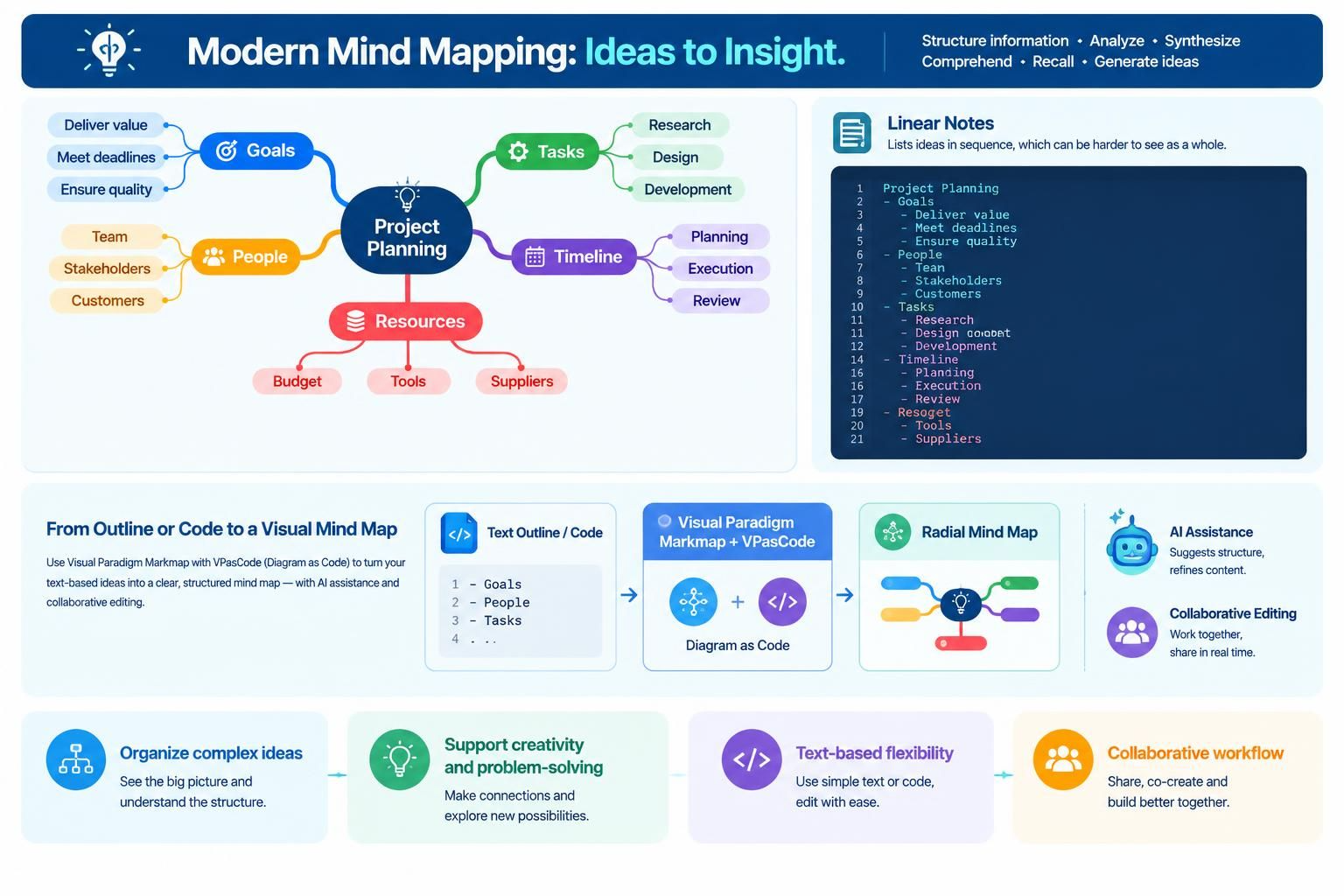
In the modern era of information overload, the ability to rapidly synthesize complex data and organize thoughts is a critical skill. Traditional linear note-taking often fails to capture the non-linear nature of human cognition. This is where the evolution of mind mapping comes into play, specifically through the integration of text-based diagramming and Artificial Intelligence.
This tutorial explores the transformative power of Visual Paradigm Markmap and VPasCode. We will move beyond simple drawing tools to understand how “Diagram as Code” combined with AI assistance creates a dynamic, version-controlled, and collaborative environment for brainstorming, project planning, and knowledge organization.
The Architecture of Thought: Why Diagram as Code?
Traditionally, mind mapping has been a graphical exercise involving drag-and-drop interfaces. While intuitive, these tools can become cumbersome when managing large, complex maps or collaborating with teams who need to track changes.
The “Diagram as Code” paradigm flips this model. Instead of interacting with a canvas, you interact with a text file. This approach offers a distinct architectural advantage for both personal knowledge management and professional workflows:
- Version Control: Just like source code, text-based diagrams can be stored in Git repositories. You can track the history of your ideas, revert to previous versions, and branch out different lines of inquiry.
- Collaboration: Teams can review changes via Pull Requests, discussing specific branches of a concept before merging them into the main structure.
- Automation: Diagrams can be generated programmatically from data sources, ensuring that your visual representations are always up to date.
The Core Tool: Visual Paradigm Markmap
Visual Paradigm’s Markmap is a lightweight, Markdown-based mind mapping tool. It allows users to define the structure of a mind map using simple text syntax, which is then rendered into an interactive visualization.
The beauty of Markmap lies in its simplicity. It removes the friction of “clicking around” a UI, allowing the user to focus entirely on the hierarchy and content of their ideas.
Structuring the Map
Every mind map in Markmap follows a hierarchical structure based on Markdown syntax. The central topic is the root, and subsequent levels define the branches.
When you write a text outline, the tool automatically interprets the indentation and headers to create the visual nodes. This means you can start with a rough text dump and instantly see the structure emerge.
For example, a project plan might begin with a central topic, followed by major categories like “Marketing” or “Development.” Sub-branches then break these down into actionable items. This hierarchy ensures that the map remains organized, preventing the “spaghetti diagram” effect often seen in complex brainstorming sessions.
Advanced Workflow: VPasCode and AI Integration
While Markmap handles the Markdown syntax, VPasCode (Visual Paradigm as Code) extends this capability by supporting multiple diagram languages, including PlantUML and Mermaid, alongside a robust AI integration.
The AI Advantage
The integration of AI transforms mind mapping from a manual documentation task into an intelligent assistant. Visual Paradigm’s AI can:
- Generate from Prompts: Describe a concept, and the AI will generate the initial structure and content.
- Refine and Expand: Ask the AI to reorganize branches for better balance or to add missing details.
- Format Conversion: Seamlessly transform Markdown into other diagram formats like PlantUML or Mermaid.
PlantUML and Mermaid Support
VPasCode supports industry-standard languages for diagramming. For instance, PlantUML offers a tree syntax for mind maps, allowing for a structured, code-first approach. Similarly, Mermaid provides a JavaScript-based solution that integrates well with web documentation.
These tools allow for greater flexibility. While Markmap focuses on the Markdown syntax, VPasCode allows you to switch to PlantUML or Mermaid syntax when you need more specific styling or integration with other systems.
Practical Applications: From Brainstorming to Execution
The versatility of these tools makes them applicable across various domains. Whether you are a product manager, a developer, or a student, the principles of visual thinking apply.
1. Brainstorming and Ideation
When generating new ideas, speed is essential. Using AI to generate a first draft allows you to bypass the blank page syndrome. You can then refine the map, adding connections and visual cues. The non-linear nature of the map helps in identifying relationships between seemingly unrelated concepts.
2. Knowledge Organization
For learning and education, mind maps are superior for summarizing complex topics. By breaking down lecture notes or study materials into hierarchical branches, you create a visual “map” of the subject matter that aids in memory retention and recall.
3. Project Planning and Roadmaps
In professional settings, mind maps serve as a bridge between high-level strategy and detailed execution. A central “Project Roadmap” can branch out into specific deliverables, timelines, and resource allocation. This visual representation helps stakeholders quickly grasp the project scope and dependencies.
Best Practices for Effective Mind Mapping
To get the most out of Visual Paradigm Markmap and VPasCode, consider the following best practices:
- Start Simple: Begin with a rough sketch of your central idea. Don’t worry about perfection; refine the map as you go.
- Use Consistent Formatting: Stick to a consistent hierarchy to maintain readability. Use standard indentation or Markdown headers.
- Iterate with AI: Use AI to generate a first draft, then manually refine it. This saves time while ensuring accuracy.
- Keep It Balanced: Avoid having one branch significantly larger than others. If a branch becomes too dense, consider splitting it into a separate map.
- Collaborate: Share your files with teammates for feedback. Use the version control capabilities to track changes and discuss specific branches.
Conclusion
Mind mapping is more than just a drawing tool; it is a cognitive aid for organizing thoughts and fostering creativity. By combining traditional mind mapping principles with modern tools like Visual Paradigm’s Markmap and VPasCode, you unlock a new level of efficiency.
The integration of “Diagram as Code” and AI assistance transforms mind mapping into a dynamic, version-controlled, and collaborative process. Whether you are planning a product launch, designing a system architecture, or preparing for exams, these tools empower you to think visually and act decisively. Start small, experiment with the AI features, and watch your productivity soar.