

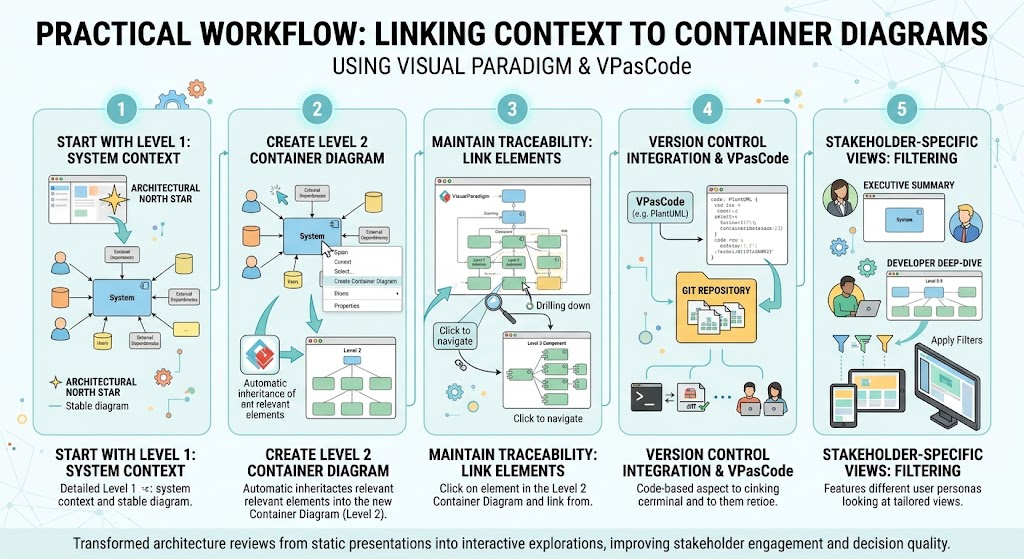
Architecture documentation often suffers from the “spaghetti diagram” problem—overly complex visuals that are hard to maintain or understand. The C4 model solves this by enforcing a hierarchical approach, allowing teams to zoom in on details only when necessary. By leveraging Visual Paradigm alongside the code-first capabilities of VPasCode, you can create a dynamic, “living” architecture repository that evolves alongside your codebase.
This tutorial walks you through the practical workflow of linking Level 1 (Context) diagrams to Level 2 (Container) diagrams, ensuring your documentation remains accurate, traceable, and accessible to all stakeholders.
The Hierarchical Workflow: Step-by-Step
Transitioning between architectural levels requires discipline. The goal is to reduce manual effort while increasing accuracy. Here is the refined workflow used by successful engineering teams.
Step 1: Start with Level 1 – The System Context
Everything begins with the Level 1 System Context Diagram. This is your “Architectural North Star.” It defines the boundary of your system, the primary users (Actors), and external dependencies (Other Systems).
- Keep it Stable: This diagram should not change frequently. If your high-level boundaries are shifting, you may be facing product definition issues rather than just documentation issues.
- Define Boundaries: Clearly separate what is “in scope” (your system) from what is “out of scope” (external users or legacy systems).
Step 2: Create Level 2 – The Container Diagram
Once your context is established, you drill down into the internals. In Visual Paradigm, you don’t need to redraw everything.
- Right-Click Action: Locate the
Systemelement in your Level 1 diagram. - Generate Diagram: Right-click the element and select “Create Container Diagram”.
- Automatic Inheritance: Visual Paradigm automatically creates a new diagram. Crucially, it inherits relevant elements from the parent level. This drastically reduces duplication and ensures that if you rename a system in Level 1, it reflects in Level 2.
Step 3: Maintain Traceability
A diagram that cannot be navigated is a dead end. Visual Paradigm’s linking features allow for seamless navigation between levels.
- Drill Down: Clicking a container in the Level 2 diagram should instantly navigate to the corresponding Level 3 Component Diagram.
- Upward Navigation: Conversely, you can trace a component back to the container it belongs to. This bi-directional traceability is essential for debugging and impact analysis.
Version Control & VPasCode
To achieve true “DevOps for Documentation,” diagrams must be treated as code. This is where VPasCode shines.
Instead of managing binary .vpp files that are difficult to diff in Git, you can export your diagrams to PlantUML format. This allows you to:
- Commit to Repository: Store architecture definitions alongside your application source code.
- Code Review: Treat architecture changes as Pull Requests. Reviewers can see exactly what has changed in the system structure.
- CI/CD Integration: Automate the rendering of diagrams to ensure they always match the codebase.
Stakeholder-Specific Views
Not every audience needs to see every detail. Executives care about business value; developers care about implementation details.
- Executive Summary: Use filtering to show Level 1 only. This provides a high-level view of how the system interacts with the world.
- Developer Deep-Dive: Apply filters to display Levels 2 and 3. This reveals the microservices, databases, and components required for implementation.
Conclusion
The combination of the C4 model’s rigor and Visual Paradigm’s flexibility transforms architecture reviews from static, passive presentations into interactive explorations. By starting with a stable context, automating the creation of container diagrams, and integrating with version control, teams can achieve a level of clarity that traditional tools struggle to match.