

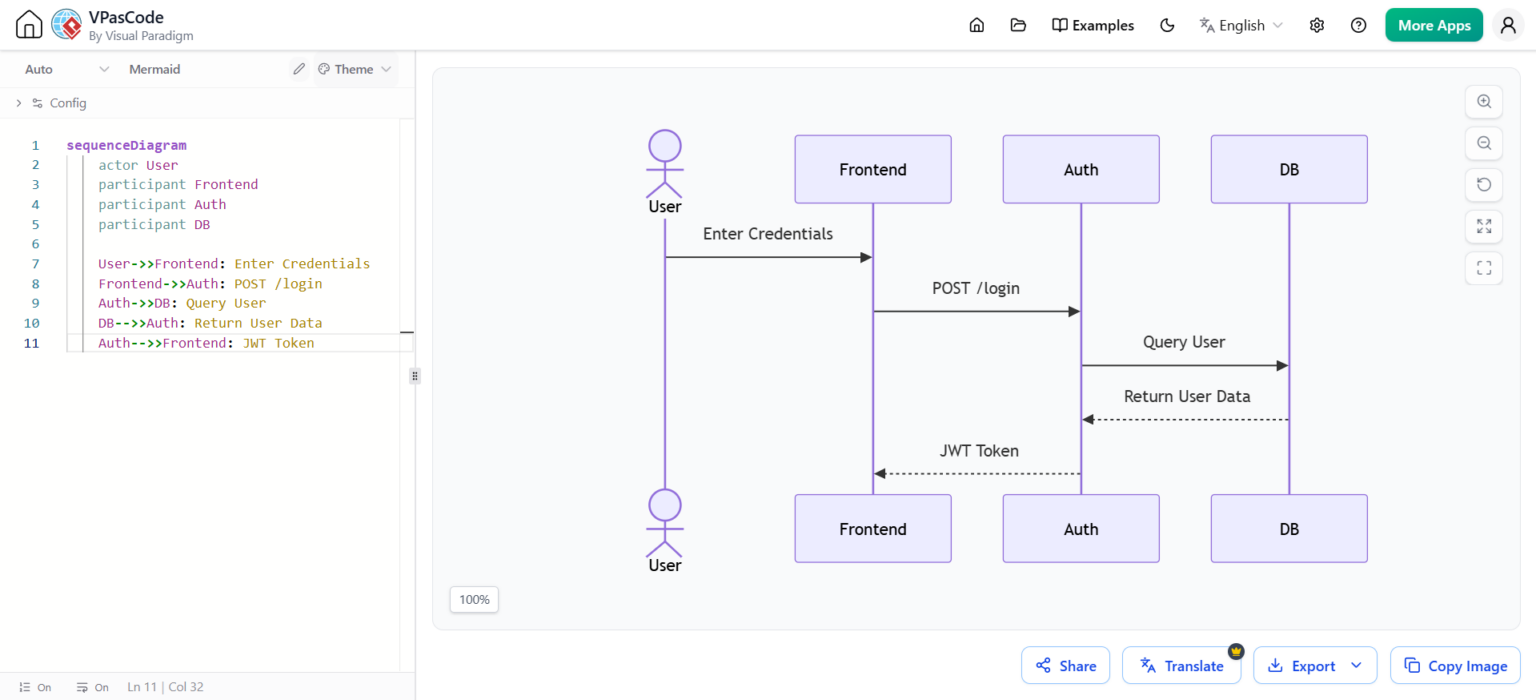
In modern software architecture, understanding how different components interact over time is critical. Sequence diagrams are the industry standard for visualizing these interactions. VPasCode, Visual Paradigm’s browser-based “Diagram-as-Code” editor, revolutionizes this process by allowing developers and architects to write diagrams using code rather than dragging and dropping shapes. This tutorial explores how to model a secure authentication flow using Mermaid syntax within VPasCode, highlighting the efficiency of text-based modeling.
Why Choose Diagram-as-Code?
Traditional diagramming tools often rely on manual layout adjustments. When you modify a complex sequence diagram, you frequently find yourself manually moving boxes and aligning arrows. VPasCode eliminates this friction by treating diagrams as code. This approach offers several distinct advantages:
- Version Control Friendly: Diagrams can be stored in Git repositories alongside your source code, making it easy to track changes.
- Consistency: Formatting is handled automatically by the engine, ensuring your documentation looks professional every time.
- Speed: Typing text is significantly faster than clicking and dragging UI elements.
Understanding the Components
Before writing the logic, let’s break down the elements required to build a robust sequence diagram. The example we will build models a standard login process involving a User, a Frontend application, an Authentication service, and a Database.
1. Actors and Participants
The foundation of a sequence diagram is defining who is involved. In Mermaid, these are defined at the top of the script.
- Actor: Represents an external human user or another system initiating the process. In the diagram, this is the
actor User. - Participant: Represents system components, such as the
participant Frontend,participant Auth, orparticipant DB.
2. The Activation Bar
When an object is performing an action or waiting for a response, it is considered “active.” VPasCode automatically generates the vertical lifeline bars (the thin vertical lines extending downwards) for you. You do not need to draw these manually.
Step-by-Step: Coding the Authentication Flow
Let’s walk through the specific Mermaid syntax used to create the sequence diagram shown in the VPasCode interface. This flow demonstrates a request-response cycle involving credentials and a JWT token.
Step 1: Defining the Actors
First, we declare the entities involved. The syntax is straightforward: the keyword followed by the identifier.
sequenceDiagram
    actor User
    participant Frontend
    participant Auth
    participant DB
Step 2: Mapping the Interaction (The Messages)
Messages are the horizontal arrows connecting the lifelines. In Mermaid, the syntax follows the pattern: ActorA->>ActorB: Message Text.
Step 2a: The Request
The user enters credentials. This is a synchronous message, indicated by the solid line and arrowhead.
User->>Frontend: Enter CredentialsStep 2b: The API Call
The Frontend forwards this data to the Auth service. Note that we can describe the specific action, such as a POST /login request.
Frontend->>Auth: POST /loginStep 2c: The Database Query
The Auth service queries the database to verify the user. This is a critical step where the Auth service is “active,” waiting for the DB.
Auth->>DB: Query UserStep 3: Handling Responses (Return Messages)
In a real-world system, actions rarely happen in a straight line. The Auth service must wait for the DB, which sends a response back. In Mermaid, a dashed line with an open arrowhead indicates a return or asynchronous message.
DB-->>Auth: Return User DataOnce the Auth service validates the user, it generates a token and sends it back to the Frontend. This is the final step in our authentication handshake.
Auth-->>Frontend: JWT TokenPutting It All Together
When you input the following complete script into the VPasCode editor, the real-time preview pane on the right will automatically render the diagram. Notice how the vertical lines (lifelines) extend automatically, and the arrows are perfectly aligned.
sequenceDiagram
    actor User
    participant Frontend
    participant Auth
    participant DB

    User->>Frontend: Enter Credentials
    Frontend->>Auth: POST /login
    Auth->>DB: Query User
    DB-->>Auth: Return User Data
Auth-->>Frontend: JWT TokenConclusion
By leveraging VPasCode, you transform the documentation process from a tedious graphical task into a streamlined coding workflow. Whether you are documenting a simple login flow or a complex distributed system, the “Diagram-as-Code” philosophy ensures your architecture diagrams are as maintainable as your actual source code.