

In the modern landscape of enterprise software architecture and business process modeling, efficiency is not just a luxury—it is a necessity. The Visual Paradigm Unified Platform represents a paradigm shift from fragmented tool usage to a cohesive, centralized engineering environment. This tutorial explores the technical architecture behind this platform, focusing on how it eliminates siloed work, streamlines discovery, and enables seamless bi-directional data flow between cloud and desktop environments.
1. Eliminating Siloed Work: The Centralized Hub Architecture
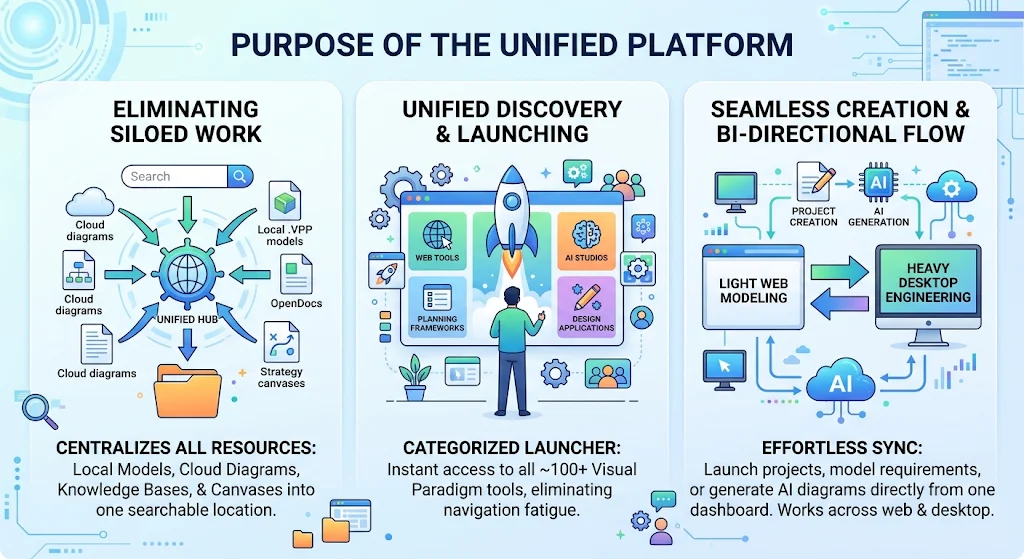
Historically, software architects and business analysts have suffered from “data fragmentation.” Requirements might live in Word documents, UML diagrams in a local client, and web-based flowcharts in a browser cache. The Unified Platform solves this by establishing a Unified Hub.
At the core of this architecture is a centralized indexing system. The platform aggregates disparate file types and data sources into a single, searchable entity. This means you no longer need to memorize which application holds the “Project Alpha” requirements.
- Local .vpp Desktop Models: Heavy-duty engineering models (like complex Statecharts or System Architecture diagrams) stored locally are indexed and made accessible.
- Cloud-Saved Web Diagrams: Lightweight diagrams created in the browser are synced to the central repository.
- OpenDocs Knowledge Bases: Textual requirements and documentation are linked to visual models, creating a semantic connection between “what” we build and “how” we model it.
- Strategy Canvases: Business models and strategic planning artifacts are integrated directly with the engineering data.
2. Unified Discovery & Launching: The Categorized Launcher
One of the most significant UX challenges in large engineering suites is “app navigation fatigue.” With over 100+ tools available, finding the right canvas can be difficult. The Unified Platform introduces a Categorized Launcher to solve this.
This is not merely a list of shortcuts; it is a dynamic dashboard that categorizes tools based on their function. The architecture groups these tools into logical clusters:
- Web Tools: For browser-based, collaborative modeling that requires no installation.
- AI Studios: Generative AI environments for automated diagram creation.
- Planning Frameworks: Structured methodologies like BPMN, UML, and ArchiMate.
- Design Applications: UI/UX prototyping and wireframing tools.
By unifying these under one roof, the platform reduces the cognitive load on the user, allowing them to focus on modeling rather than navigating menus.
3. Seamless Creation & Bi-Directional Flow
The true power of the Visual Paradigm ecosystem lies in its Bi-Directional Flow. This feature bridges the gap between the flexibility of web-based modeling and the robustness of desktop engineering.
The Architecture of Sync
When you launch a project from the dashboard, the system determines the appropriate context:
- Light Web Modeling: For quick requirements gathering or brainstorming, the project runs in the cloud environment. Data is stored in a JSON-like structure optimized for speed.
- Heavy Desktop Engineering: When the project matures, it can be opened in the desktop client for complex operations, code generation, and offline work.
Crucially, the synchronization is effortless and bi-directional. Changes made in the cloud (e.g., a stakeholder updating a requirement) are immediately reflected in the desktop model, and vice versa. This ensures that the “Single Source of Truth” is maintained across all platforms.
AI Integration
Furthermore, the platform integrates AI Project Generation. From the dashboard, you can input a text prompt, and the AI studio will generate the initial structure of a project, creating the necessary diagrams and requirements artifacts automatically. This generated content is then immediately available for editing in the standard modeling tools.
Conclusion
The Visual Paradigm Unified Platform is more than just a collection of tools; it is a comprehensive ecosystem designed to eliminate friction. By centralizing resources, categorizing discovery, and ensuring bi-directional synchronization, it allows architects and engineers to move faster and with greater confidence.