

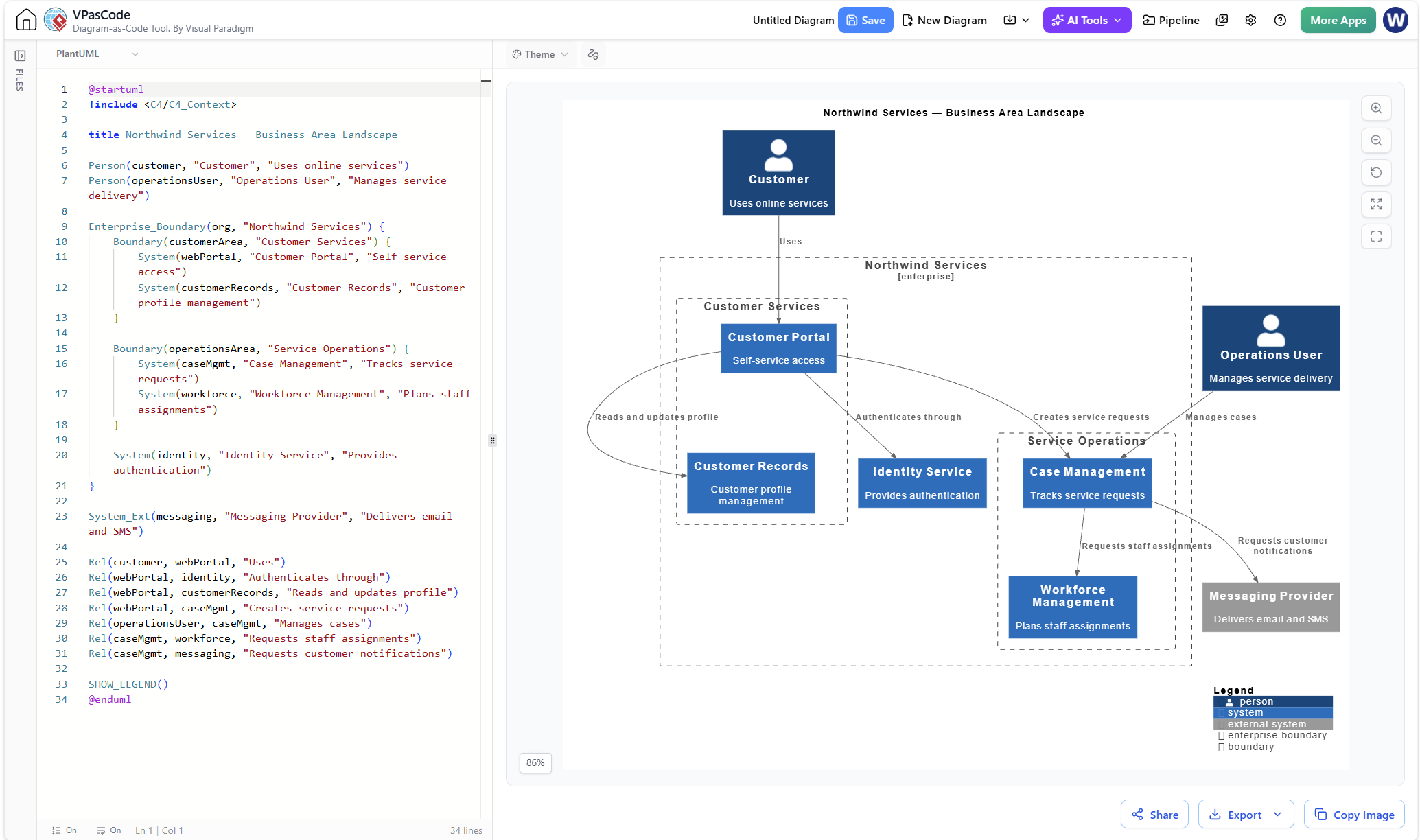
In the fast-paced world of Agile Enterprise Architecture, clarity is currency. Teams often struggle to understand how their specific microservices fit into the broader business ecosystem. This is where the C4 System Landscape model becomes an indispensable asset. Unlike lower-level diagrams that focus on the internal machinery of a single application, a landscape view provides a strategic, high-level map of the entire software portfolio.
This tutorial explores how to leverage Visual Paradigm’s ecosystem—combining its powerful C4 Modeling Tool with the text-driven precision of VPasCode—to create, maintain, and evolve these critical architectural artifacts.
1. The Philosophy of the Landscape View
The C4 model consists of four hierarchical levels: Context, Container, Component, and Code. The Landscape view is often misunderstood as merely a “Level 0” diagram. However, it serves a distinct purpose: it answers the question, “How do the systems in this specific area fit together?”
A landscape diagram is unique because it steps back to show the relationships between multiple systems, rather than zooming in on one. It is essentially a System Context view without a specific system in focus. It is a map of the “who” and the “what” across a chosen organizational scope, such as a department, a product portfolio, or an entire enterprise.
Key Characteristics of a Landscape Diagram:
- Scope-Centric: It focuses on a specific boundary (e.g., “Retail Operations”) rather than trying to draw every server in the company.
- System-Level Abstraction: It treats applications, services, and external systems as single boxes. It deliberately excludes internal details like database schemas or API endpoints.
- Relationship-Heavy: The value lies in the labeled arrows connecting the systems (e.g., “Submits Orders”, “Authenticates Users”).
2. The Visual Paradigm Ecosystem: Two Paths to the Same Goal
Visual Paradigm offers a dual-approach workflow that caters to different architectural preferences. You can choose the visual modeler for high-level design or the diagram-as-code approach for version control and AI-assisted generation.
Approach A: The Visual C4 Modeler
The Visual Paradigm C4 Modeler is a graphical interface designed for teams that prefer “drag-and-drop” editing. It is ideal for:
- Architects who need to rapidly sketch out ideas.
- Presentations where visual polish is paramount.
- Teams needing to manage complex hierarchies and linked sub-diagrams in a single workspace.
Approach B: VPasCode (Diagram-as-Code)
VPasCode is Visual Paradigm’s browser-based editor that allows you to write C4 diagrams using PlantUML syntax. This approach is gaining traction in Agile teams for its:
- Version Control: Text files can be stored in Git alongside source code.
- Reviewability: Diff tools make it easy to see exactly what changed in a diagram.
- AI Integration: You can prompt AI to generate or modify the diagram text, speeding up the drafting process.
3. Designing a Landscape Diagram: Best Practices
Whether you are drawing boxes on a canvas or typing PlantUML macros, the underlying principles of the C4 Landscape view remain the same.
- Define a Purposeful Scope: Do not attempt to map the entire enterprise if it results in a messy diagram. Instead, create a focused “Retail Operations Landscape” or a “Customer Services Landscape.”
- Consistent Abstraction: Ensure you are strictly at the System level. Do not mix “Container” boxes (like a web server) with “System” boxes (like the whole application) unless you are explicitly explaining why.
- Label Relationships Clearly: Avoid vague labels like “uses” or “connects.” Be specific: use “Submits Orders”, “Provides Identity”, or “Processes Payments”.
- Mark Boundaries: Clearly distinguish between internal systems (which you own) and external systems (which you depend on). Visual Paradigm supports
EnterpriseBoundaryandSystemExtfor this purpose.
4. Workflow: From Draft to Document
A recommended workflow for Agile teams combines AI, Code, and Visual editing to ensure accuracy and maintainability.
- Collect Facts: Gather verified information from system owners regarding who uses the system and what it connects to.
- AI-Assisted Drafting: Use VPasCode’s AI capabilities to generate an initial PlantUML draft based on a textual description. For example: “Create a landscape for the Customer Services department including a Portal, Identity Service, and external Messaging Provider.”
- Code Review: Inspect the generated PlantUML code. AI is great for syntax, but humans must verify the logic and relationships.
- Visual Refinement: If the diagram needs to be part of a larger architecture project, import the code into the Visual Paradigm C4 Modeler for visual tweaking and linking to detailed sub-diagrams.
- Linkage: Ensure that every system in the landscape links to its corresponding “System Context” diagram for deeper exploration.
5. Common Pitfalls to Avoid
As you build your landscape diagrams, watch out for these common mistakes:
- Scope Creep: Trying to include every database or microservice. Remember, the landscape is a map of systems, not infrastructure.
- Vague Labels: Using generic arrows makes the diagram useless for understanding data flow or dependencies.
- Mixing Levels: Accidentally adding component-level boxes to a landscape view creates cognitive overload.
- Static Artifacts: Treating the diagram as a one-time deliverable. A landscape must be maintained; assign an “owner” to keep it updated as the architecture evolves.
Conclusion
C4 Landscape diagrams are the bridge between high-level business strategy and technical implementation. By utilizing Visual Paradigm’s flexible tools—switching between the visual power of the Modeler and the precision of VPasCode—Agile teams can create living documentation that clarifies complexity and fosters better architectural decisions.