

In the fast-paced world of modern software development, the gap between a high-level architectural vision and the gritty reality of implementation often leads to miscommunication. For Agile teams and Enterprise Architects alike, the challenge is to maintain clarity without getting bogged down in bureaucratic overhead. This is where the C4 Model, specifically the Component Diagram, combined with the “Diagram-as-Code” philosophy of Visual Paradigm’s VPasCode and AI assistance, becomes a game-changer.
This tutorial explores how to leverage these tools to create living, breathing architectural documentation that evolves with your codebase, ensuring your teams stay aligned and your systems remain understandable.
The Component Diagram: The “Sweet Spot” of Architecture
Software architecture is often visualized through a hierarchy of diagrams. While Context diagrams give a bird’s-eye view and Container diagrams show deployable units, the Component Diagram (Level 3) is widely considered the most valuable for technical teams. It strikes the perfect balance between abstraction and implementation details.
What Defines a Component?
Unlike a class or a function, a component represents a cohesive grouping of related functionality encapsulated behind a well-defined interface. Think of it as a logical module, a library, a microservice, or a major functional area within a monolithic application.
Key principles for defining components include:
- Abstraction Level: They sit between containers and code. They are too abstract to show every line of code, but too detailed to be a vague business service.
- Responsibility Clarity: Following the Single Responsibility Principle, each component should do one thing well.
- Interface-Driven: Interaction is defined by explicit interfaces, promoting loose coupling.
Why “Diagram-as-Code”?
Traditional drag-and-drop modeling tools often result in “floor diagrams”—static images that are difficult to maintain. When a developer changes a method or adds a feature, the diagram often becomes stale, leading to “documentation debt.”
VPasCode (Visual Paradigm as Code) solves this by allowing you to write diagrams in text using standard syntax (like PlantUML). This approach offers several distinct advantages for Agile teams:
- Version Control Friendly: Just like your source code, your diagrams can be committed to Git, tracked, and reviewed.
- Consistency: Templates and linting ensure that every diagram follows the same standards across the organization.
- Automation: Diagrams can be generated automatically during CI/CD pipelines, ensuring the documentation is always up to date.
Building a Legacy Integration Pattern
To understand the power of the C4 Component Diagram, let’s look at a common scenario: integrating a modern application with a legacy system. This requires showing how data flows and how complexity is managed.
Scenario: Modern Application to Legacy ERP
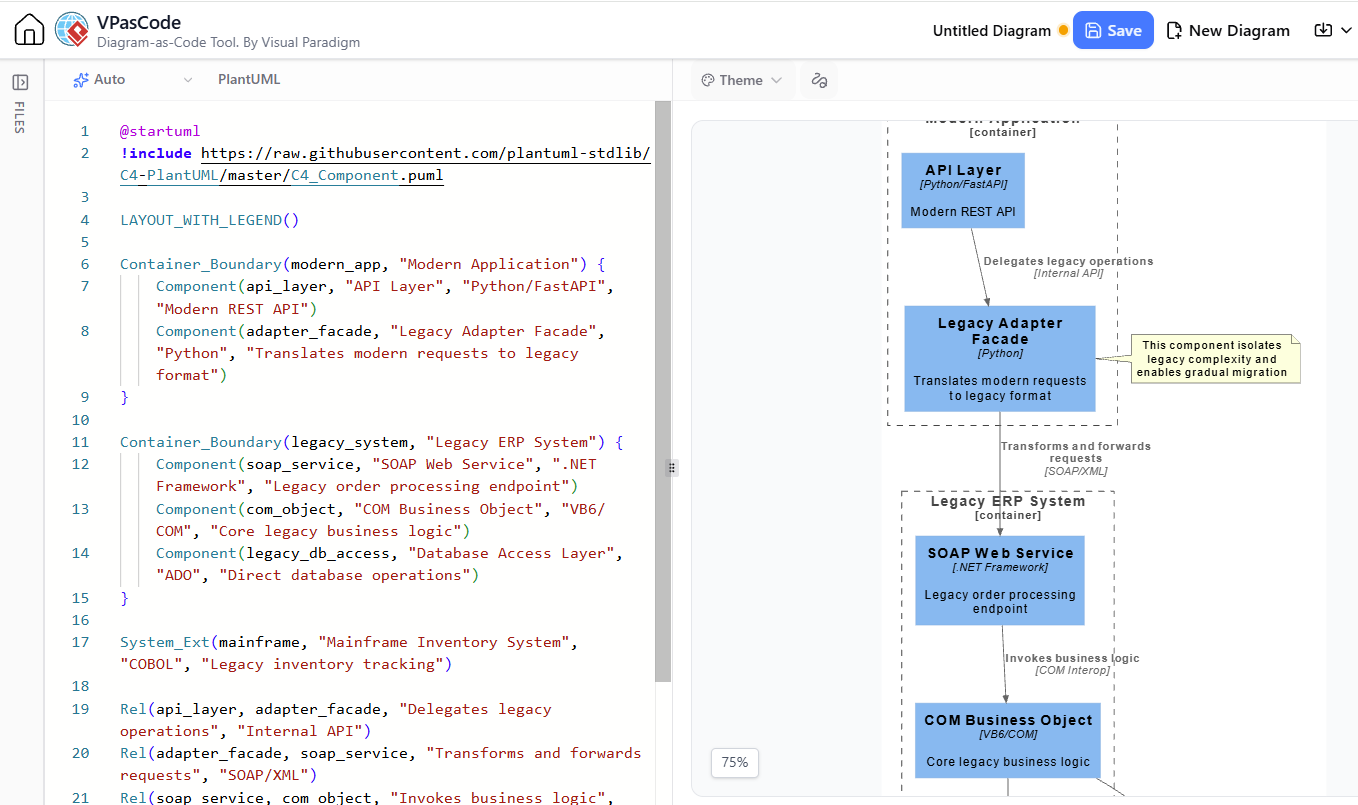
In this scenario, a modern Python-based API needs to communicate with a legacy .NET-based ERP system and a mainframe inventory system. The goal is to isolate the complexity of the legacy systems so the modern team doesn’t have to deal with it directly.
We define a “Legacy Adapter Facade” component. This acts as a bridge, translating modern requests into legacy formats.
Modeling the Structure
When modeling this in VPasCode, you define containers for the “Modern Application” and the “Legacy ERP System.” Inside the modern container, you place the API Layer and the Adapter Facade. Inside the legacy container, you place the SOAP Web Service and the COM Business Object.
The relationships are crucial here. You are not just drawing lines; you are documenting the contract. You define that the API Layer delegates operations to the Adapter, which then transforms and forwards requests via SOAP to the legacy system.
Enhancing the Workflow with AI
Writing code from scratch can still be time-consuming. This is where AI-assisted features come into play. Modern tools can now interpret natural language descriptions to generate initial diagrams.
Imagine you simply type a prompt: “Create a component diagram for a microservices-based user authentication system with OAuth2 and multi-factor authentication.” The AI can instantly scaffold the structure, suggesting components like “Token Service,” “Identity Provider,” and “MFA Validator.”
Beyond generation, AI can analyze your source code to suggest component boundaries. If your codebase has a file with 500 lines that handles both database access and UI logic, the AI can flag this as a potential component violation, suggesting a split to improve modularity.
Best Practices for Agile Teams
To get the most out of C4 Component Diagrams in an Agile environment, consider these strategies:
- Start Simple: Don’t try to model the entire system at once. Start with the major components and add detail only as needed for specific discussions.
- Living Documentation: Treat diagrams as code. If a diagram doesn’t match the code, the code is usually right, and the diagram needs updating. Automate this update process where possible.
- Focus on Interfaces: Show what a component does (the interface), not how it does it (the implementation). This keeps the diagram readable even as the underlying code changes.
- Use Consistent Naming: Agree on naming conventions. Use verbs for interfaces (e.g., “ProcessPayment”) and nouns for components (e.g., “Payment Processor”).
Conclusion
The C4 Model, when paired with the “Diagram-as-Code” approach of VPasCode and AI assistance, transforms architectural documentation from a static burden into a dynamic asset. It empowers Agile teams to visualize complex systems, manage technical debt, and onboard new members effectively. By focusing on interfaces and logical boundaries rather than implementation minutiae, teams can ensure their architecture remains clear, consistent, and aligned with business goals.