

In the complex ecosystem of project management, understanding how a project will be resourced is just as critical as understanding what work needs to be done. This is where the Resource Breakdown Structure (RBS) becomes an indispensable tool. Unlike a Work Breakdown Structure (WBS), which focuses on deliverables and tasks, the RBS organizes resources by category and type, providing a clear hierarchy of the human, physical, and software assets required to execute a project.
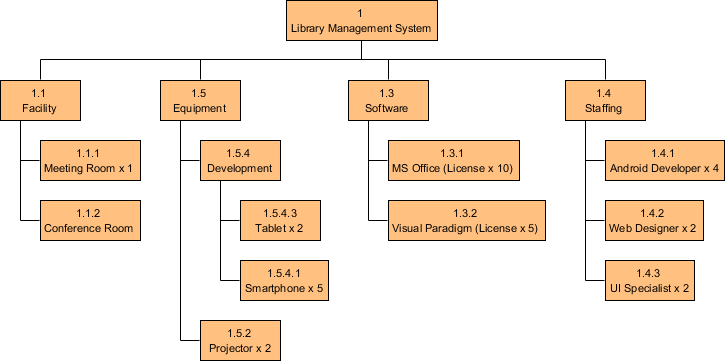
The diagram provided illustrates the breakdown of resources for a hypothetical Library Management System. This visual hierarchy allows project managers to see at a glance exactly what facilities, equipment, software licenses, and personnel are needed, preventing budget overruns and resource bottlenecks.
Understanding the Hierarchy of the RBS
The core concept of the RBS is hierarchical decomposition. Just as a tree branches out from a single trunk into smaller limbs, the RBS starts with the project name and branches out into resource categories, and further into specific resource types and quantities.
1. The Project Level (Level 1)
At the very top of the structure is the project itself. In our example, this is the 1 Library Management System. This node serves as the root of the tree, encompassing all resource requirements for the entire initiative.
2. Resource Categories (Level 1.x)
Beneath the project level, the resources are typically grouped into major categories. Looking at the diagram, we can identify four distinct categories:
- 1.1 Facility: The physical spaces required.
- 1.5 Equipment: The hardware and tools needed.
- 1.3 Software: The digital tools and licenses required.
- 1.4 Staffing: The human resources and roles involved.
3. Specific Resources (Level 1.x.x)
At the lowest level of the hierarchy, we find the specific items. These nodes contain the granular details, including the specific name of the resource and its quantity (e.g., “x 1”, “x 4”).
Analyzing the Resource Breakdown
Let’s walk through the specific branches of the diagram to understand the resource implications for this project.
Facility Requirements
The Facility branch (1.1) breaks down into two specific areas. The project requires a Meeting Room (1.1.1) for team coordination and a Conference Room (1.1.2), likely for client presentations or larger stakeholder meetings.
Equipment Inventory
The Equipment branch (1.5) is the most complex in this diagram, highlighting the hardware needs of the development team:
- Development Environment (1.5.4): This sub-category suggests a specific need for hardware dedicated to development tasks.
- Tablets (1.5.4.3): 2 units are required, possibly for prototyping or mobile testing.
- Smartphones (1.5.4.1): 5 units are required, crucial for testing the library management system on various mobile devices.
- Projectors (1.5.2): 1 unit is needed for the meeting or conference spaces.
Software Licensing
The Software branch (1.3) is critical for budgeting. It lists two specific needs:
- MS Office: 10 licenses are required, ensuring that the entire team has standard productivity tools.
- Visual Paradigm: 5 licenses are required. This is a specialized modeling tool, indicating that the project involves significant system architecture or diagramming work.
Staffing Roles
The Staffing branch (1.4) defines the team composition. It moves beyond general labor to specific job titles:
- Android Developer (1.4.1): 4 developers are needed, suggesting a heavy focus on the mobile aspect of the library system.
- Web Designer (1.4.2): 2 designers are allocated for the user interface.
- UI Specialist (1.4.3): 2 specialists are needed to ensure the user experience is consistent across platforms.
Implementing the RBS in Visual Paradigm
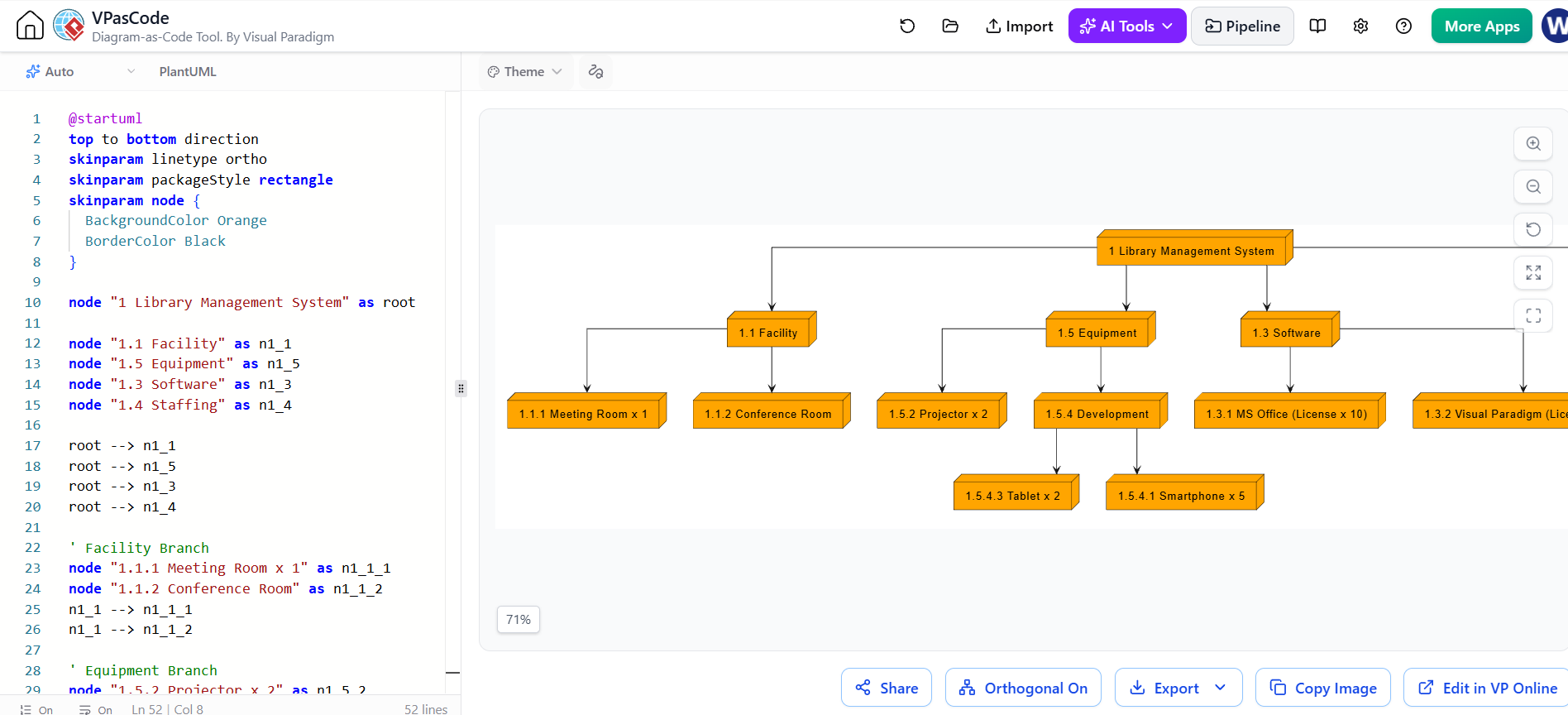
Creating this structure manually can be tedious and prone to formatting errors. Tools like Visual Paradigm offer powerful AI assistance to automate the generation of these diagrams. By utilizing the VPasCode tool, you can generate the RBS using a simple text-based syntax.
VPasCode allows you to define the hierarchy using indentation and specific keywords. The tool parses this text and renders it into the professional organizational chart you see in the example.
WBS Generated by Visual Paradigm AI Chatbot:
@startuml
top to bottom direction
skinparam linetype ortho
skinparam packageStyle rectangle
skinparam node {
  BackgroundColor Orange
  BorderColor Black
}

node "1 Library Management System" as root

node "1.1 Facility" as n1_1
node "1.5 Equipment" as n1_5
node "1.3 Software" as n1_3
node "1.4 Staffing" as n1_4

root --> n1_1
root --> n1_5
root --> n1_3
root --> n1_4

' Facility Branch
node "1.1.1 Meeting Room x 1" as n1_1_1
node "1.1.2 Conference Room" as n1_1_2
n1_1 --> n1_1_1
n1_1 --> n1_1_2

' Equipment Branch
node "1.5.2 Projector x 2" as n1_5_2
node "1.5.4 Development" as n1_5_4
node "1.5.4.3 Tablet x 2" as n1_5_4_3
node "1.5.4.1 Smartphone x 5" as n1_5_4_1
n1_5 --> n1_5_2
n1_5 --> n1_5_4
n1_5_4 --> n1_5_4_3
n1_5_4 --> n1_5_4_1

' Software Branch
node "1.3.1 MS Office (License x 10)" as n1_3_1
node "1.3.2 Visual Paradigm (License x 5)" as n1_3_2
n1_3 --> n1_3_1
n1_3 --> n1_3_2

' Staffing Branch
node "1.4.1 Android Developer x 4" as n1_4_1
node "1.4.2 Web Designer x 2" as n1_4_2
node "1.4.3 UI Specialist x 2" as n1_4_3
n1_4 --> n1_4_1
n1_4 --> n1_4_2
n1_4 --> n1_4_3

@endumlConclusion
The Resource Breakdown Structure is more than just a list of supplies; it is a strategic map of the project’s capabilities. By breaking down the Library Management System project into its constituent resources, the project manager ensures that every room, device, license, and team member is accounted for before work begins.