

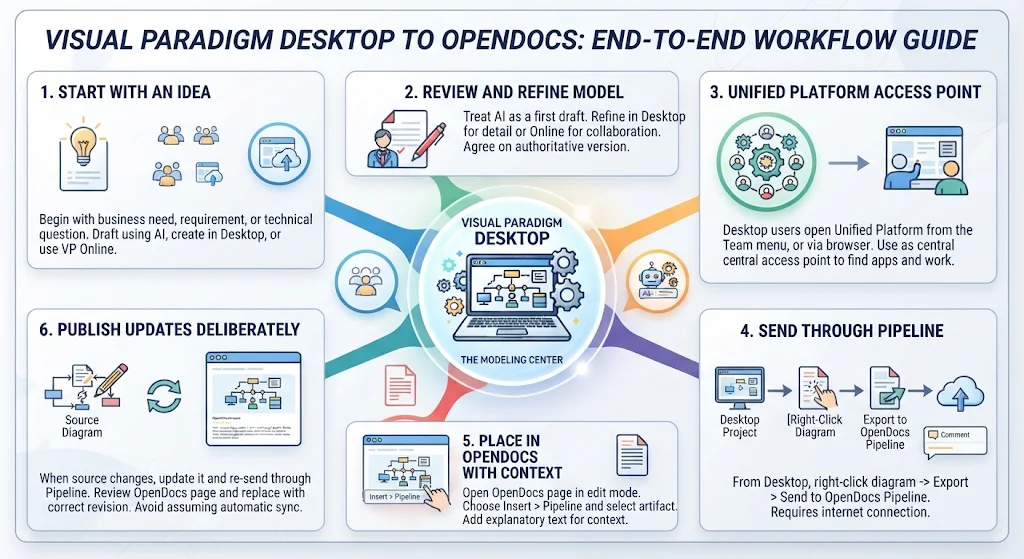
In the modern landscape of enterprise architecture and software engineering, the ability to visualize complex systems is paramount. However, a diagram is only as valuable as the context surrounding it and the ease with which teams can collaborate on it. Visual Paradigm has evolved beyond a standalone desktop application into a robust, interconnected ecosystem. This guide explores the strategic workflow of moving from an initial idea to a fully documented, published artifact using Visual Paradigm Desktop, its AI capabilities, and the broader platform tools.
The Architecture of a Connected Workflow
The core philosophy behind the Visual Paradigm ecosystem is not just about drawing diagrams, but about managing the lifecycle of a model. The architecture is designed to handle three distinct phases: creation, collaboration, and documentation.
- Visual Paradigm Desktop: This is your primary workbench. It is the heavy lifter for building and refining structured project diagrams. It is the ideal environment for detailed modeling, ongoing project maintenance, and engineering-oriented capabilities where precision is key.
- VP Online: This browser-based tool complements the desktop edition. It is best utilized when work requires immediate web access or seamless collaboration among team members who may not be in the same location or on the same machine.
- AI Tools: Integrated directly into the ecosystem, these tools serve as a rapid ideation engine. They allow you to draft diagrams or explore ideas from text prompts. However, they function best as a “first draft” generator rather than a final output engine.
- Pipeline: Think of the Pipeline as the transport layer. It is the specific transfer route for supported artifacts between Visual Paradigm tools. It bridges the gap between the local modeling environment (Desktop) and the cloud-based documentation environment (OpenDocs).
- OpenDocs: This is the destination for your work. OpenDocs is a place to combine diagrams with explanatory text and project documentation. It transforms a standalone graphic into a living document.
- Unified Platform: Acting as the central hub, the Unified Platform is the workspace for discovering apps and accessing artifacts across the ecosystem. It organizes access but does not replace the individual tools.
Step-by-Step: The End-to-End Modeling Lifecycle
To effectively utilize this ecosystem, one must follow a deliberate workflow. This process ensures that models remain accurate, documentation is context-rich, and version control is maintained.
Phase 1: Ideation and Initial Drafting
The journey begins with a business need, a user requirement, a process description, or a technical question. At this stage, you have three primary options for creation:
- AI-Assisted Drafting: Use the embedded AI tools to generate a preliminary diagram based on your prompt. This is excellent for breaking through creative blocks or rapidly visualizing a concept.
- Desktop Modeling: Create the diagram directly in Visual Paradigm Desktop for those who prefer a structured, manual approach with immediate access to deep modeling features.
- VP Online: Utilize the browser-based tool if the task benefits from web access or if you need to start the work immediately without installing software.
Crucial Step: Regardless of the tool used, ensure you keep relevant requirements, decisions, or notes with the project. This context is vital for reviewers to understand what the diagram is intended to represent.
Phase 2: Review and Refine the Model
Treat any AI-generated output as a first draft, not an approved design. The refinement phase is where the technical value is added.
- Check that the diagram reflects the requirements accurately.
- Ensure consistent terminology is used throughout the model.
- Verify that important relationships and flows are correctly depicted.
You may choose to refine the model in Desktop if the work needs detailed modeling and continued project maintenance, or in an online tool if collaborative browser-based editing is a better fit for the current task. It is imperative to agree on which version is authoritative. Depending on the workflow, this might be maintained in a Desktop project or an online artifact. Avoid treating several exported copies as equally current; a single source of truth is essential for integrity.
Phase 3: Accessing the Unified Platform
Once the model is refined, the team needs a central point of access. Desktop users can open the Unified Platform from the Team / Unified Platform > Unified Platform menu. Teams can also access the platform through a browser.
Use the Unified Platform as a starting point to find or launch relevant apps and locate work across the ecosystem. Note that the exact apps and artifacts available depend on the user’s account and setup.
Phase 4: The Pipeline Transfer
For the Desktop-to-OpenDocs workflow, the Pipeline serves as the bridge. This step moves the artifact from the local modeling environment to the cloud-based documentation environment.
To send a diagram through the Pipeline:
- Open the project and diagram in Visual Paradigm Desktop.
- Right-click the diagram and choose Export > Send to OpenDocs Pipeline.
- Save the project if prompted.
- Add an optional comment that identifies the artifact’s purpose or revision.
- Confirm the transfer.
This action sends the diagram to the cloud-based Pipeline for use in OpenDocs. Note: This transfer requires an active internet connection. The menu or steps may vary by version, so teams should confirm the workflow in their installed product.
Phase 5: Contextualizing in OpenDocs
Once the artifact has arrived in the cloud, the next step is to place it in OpenDocs with context. A diagram in isolation can be ambiguous; a diagram with context is a powerful communication tool.
- Open or create the relevant OpenDocs page and enter edit mode.
- Place the cursor where the diagram belongs.
- Choose Insert > Pipeline and select the artifact.
- Add text that explains the diagram’s purpose, scope, assumptions, and any decisions readers need to understand.
This combination makes the diagram easier to use, especially for requirements documents, architecture references, process guides, project wikis, and onboarding materials.
Phase 6: Deliberate Publishing and Updates
When the source diagram changes, the update process must be deliberate. You must update the diagram in the tool where it is maintained (e.g., Desktop) and send the revised artifact through the Pipeline.
Then, review the OpenDocs page and select or replace the embedded artifact with the appropriate revision. Do not assume that editing the Desktop diagram automatically changes every copy or document that uses it. Always review the page after an update to ensure the diagram and its accompanying explanation still agree.
Team Practices for Maximum Productivity
To get the most out of this ecosystem, teams should adopt specific practices:
- Name artifacts consistently: Include a project or feature name and a meaningful status or revision marker.
- Use Pipeline comments: Briefly describe why an artifact was sent or what changed during the transfer.
- Assign ownership: Clearly decide who maintains the source model and who updates the associated OpenDocs page.
- Review before publishing: Have the people responsible for the design or process check AI-generated and manually created diagrams.
- Keep documentation contextual: Explain the diagram’s purpose and assumptions rather than embedding it without interpretation.
- Pilot before standardizing: Test the Desktop-to-Pipeline-to-OpenDocs workflow on one project, then adapt it to team needs.
- Check access and licensing: Features can depend on the app, Desktop edition, account entitlements, or subscription status. Confirm requirements before relying on a feature for an established team process.
Conclusion
Visual Paradigm Desktop, VP Online, AI tools, Pipeline, OpenDocs, and the Unified Platform can support a connected workflow from modeling to collaboration and documentation. A practical pattern is to use AI for drafts when helpful, maintain a clearly identified source model, send reviewed artifacts through Pipeline, and place them in OpenDocs with enough explanation for readers to use them.
The productivity benefit comes from clear ownership and deliberate handoffs—not from assuming all tools synchronize automatically. When teams agree on where work lives, how revisions are published, and who reviews them, the ecosystem can make models easier to find, maintain, and understand.