

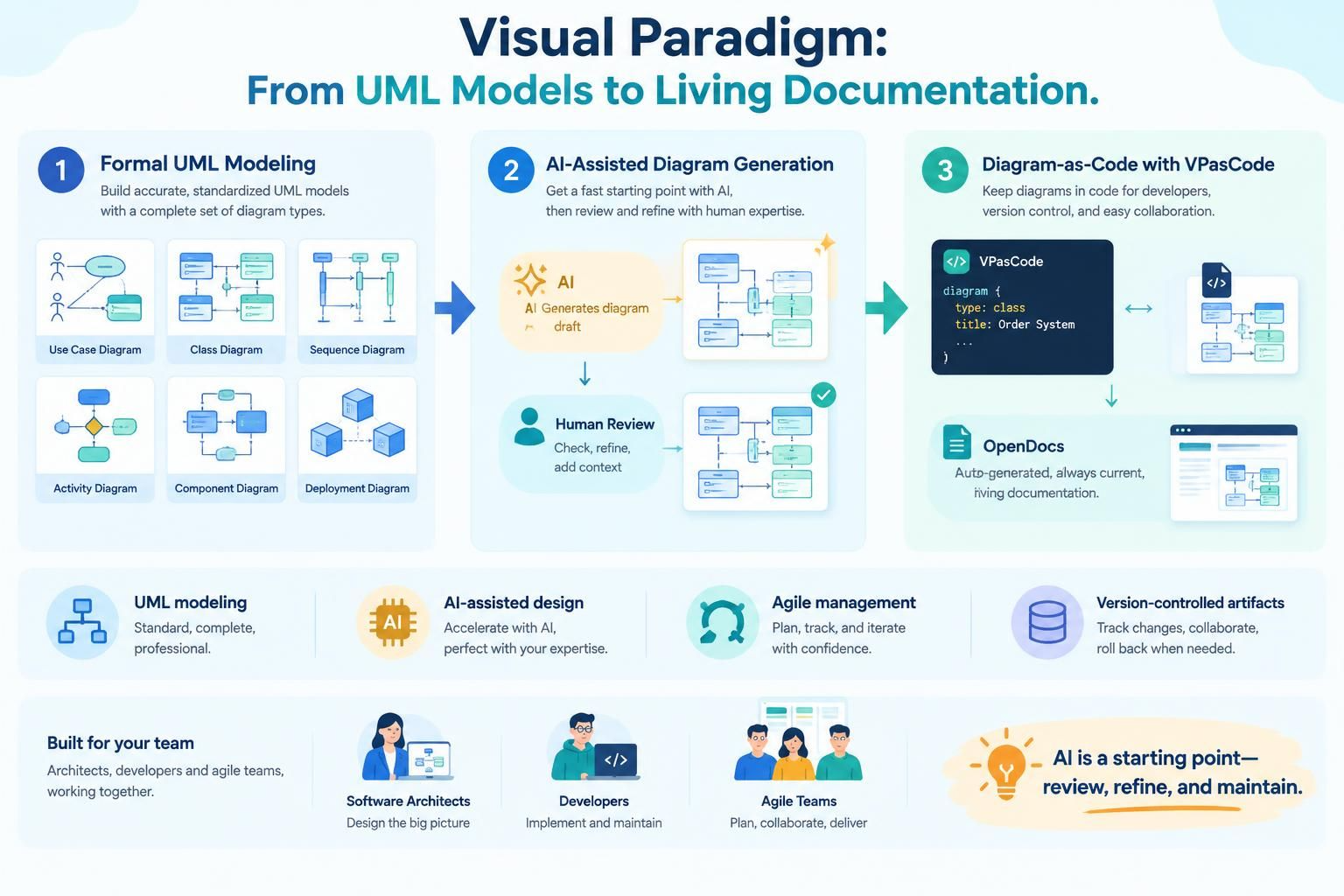
In the rapidly shifting landscape of software development, the traditional role of UML (Unified Modeling Language) has often been misunderstood as a bureaucratic hurdle—a rigid, academic exercise that slows down agile teams. However, the integration of Artificial Intelligence and the “Diagram-as-Code” paradigm has fundamentally reshaped how Visual Paradigm and similar modern tools approach system architecture. This tutorial explores the transition from static modeling to dynamic, AI-assisted living documentation, and how this evolution serves the needs of Agile development.
The Shift: From Static Diagrams to Living Systems
Historically, software architects would spend weeks drawing high-fidelity diagrams in tools that produced static images (like PNGs or JPEGs). Once these images were pasted into a Word document or a wiki page, they were effectively dead. If a developer changed a method signature or a database schema, the diagram remained unchanged, leading to a “screenshot problem” where documentation no longer reflected reality.
The modern approach, championed by platforms like Visual Paradigm, treats diagrams as executable, living artifacts. Instead of drawing lines on a canvas, engineers define relationships in code (using VPasCode with PlantUML or Mermaid). This allows the diagram to be version-controlled in Git alongside the application code, ensuring that the architecture documentation is always synchronized with the actual system.
The AI Revolution in UML Modeling
One of the most significant barriers to adopting rigorous UML modeling has been the learning curve. The syntax and rules of UML 2.x can be daunting for beginners and time-consuming for experts. The introduction of Generative AI has democratized this process.
1. Natural Language to Diagram
AI models within the ecosystem can now interpret plain English descriptions and convert them into structured UML diagrams. For example, if a Product Owner describes a “User Login” scenario, the AI can automatically generate the appropriate Sequence Diagram, complete with lifelines and message flows, providing an 80% complete draft in seconds.
2. State Machine Intelligence
Behavioral modeling is often the most complex part of system design. AI tools are now refined enough to identify initial states, terminal states, and transitions from lifecycle descriptions. If you describe an “Order System,” the AI can suggest states like “Order Created,” “Pending,” and “Shipped,” and map out the necessary cancellation transitions.
3. Text Analysis for Requirements
For Business Analysts, the AI serves as a bridge between text and visuals. It can analyze problem descriptions to identify candidate classes and keywords, helping teams move from unstructured requirements text to structured model elements much faster.
The “Diagram-as-Code” Workflow
The core of this modern ecosystem is the ability to write diagrams using code. This approach, often referred to as “Diagram-as-Code,” leverages editors like VPasCode. This workflow is particularly advantageous for Agile teams because it fits seamlessly into existing developer toolchains.
The typical workflow involves:
- Prompting the AI: The team uses a chatbot or natural language interface to generate a structural draft of the system.
- Reviewing Code: The AI outputs code (such as PlantUML or Mermaid) which is displayed in a browser-based editor.
- Refining with VPasCode: Developers can adjust styling, add missing relationships, or fix logical gaps using real-time previews.
- Publishing to OpenDocs: The final code is embedded into documentation. Because the documentation is “living,” any push of code changes to the repository automatically updates the rendered document.
UML vs. The C4 Model
A common question in modern architecture is whether to stick to standard UML or adopt the C4 model (Context, Containers, Components, Code). Visual Paradigm bridges this gap. While the tool is famous for its deep support of UML 2.x, it also supports the C4 model through the VPasCode ecosystem.
The C4 model is often preferred by Agile teams because it focuses on high-level abstraction rather than strict syntax. Visual Paradigm’s AI capabilities allow users to generate C4 diagrams directly from natural language, making it easier to visualize the “Big Picture” without getting bogged down in the granular details of UML state machines immediately.
Agile Methodologies and UML
Many Agile teams fear that UML implies a “Waterfall” methodology. However, Visual Paradigm’s “Agile Management” features demonstrate how modeling can accelerate rather than hinder iteration.
Round-Trip Engineering
In a pure Agile environment, code changes frequently. Visual Paradigm’s round-trip engineering ensures that the model and the code are in sync. If a developer refactors code, the UML model can reverse-engineer those changes, or vice versa. This ensures that the architecture remains accurate without requiring manual updates after every sprint.
Scrum and User Story Mapping
The platform integrates modeling directly with Agile management tools. Teams can create user story maps and burndown charts alongside their UML diagrams. This unifies the “what” (requirements/stories) with the “how” (architecture), allowing architects and developers to see the impact of a feature request on the system structure instantly.
Overcoming the “Too Hard” Hurdle
It is true that UML has a reputation for being difficult to learn. The sheer number of diagram types—Class, Component, Deployment, Use Case, Sequence, Activity, State Machine, and more—can be overwhelming. However, the “AI-assisted” approach changes the learning curve.
Instead of memorizing the syntax of every diagram type, users can rely on AI to generate the skeleton of the diagram. The human role shifts from “drafter” to “editor.” The AI handles the layout and standard notation, while the human expert focuses on the business logic and domain-specific nuances.
The “Community Edition” Advantage
For teams or students just starting out, the accessibility of these tools has improved. Free or community editions often provide access to all UML diagram types, allowing teams to assess the fit before committing to a full enterprise license. This lowers the barrier to entry for adopting formal modeling practices.
Conclusion: The Future of Architecture
The future of UML modeling is not about drawing pretty pictures for a manual that sits on a shelf. It is about creating a synchronized, version-controlled, and AI-assisted ecosystem that keeps the architecture alive. By combining the precision of UML with the speed of AI and the agility of diagram-as-code, teams can achieve a level of architectural clarity that was previously impossible.
For modern Agile teams, the goal is not to eliminate documentation, but to make it a natural part of the development workflow—something that evolves as fast as the code it describes.