

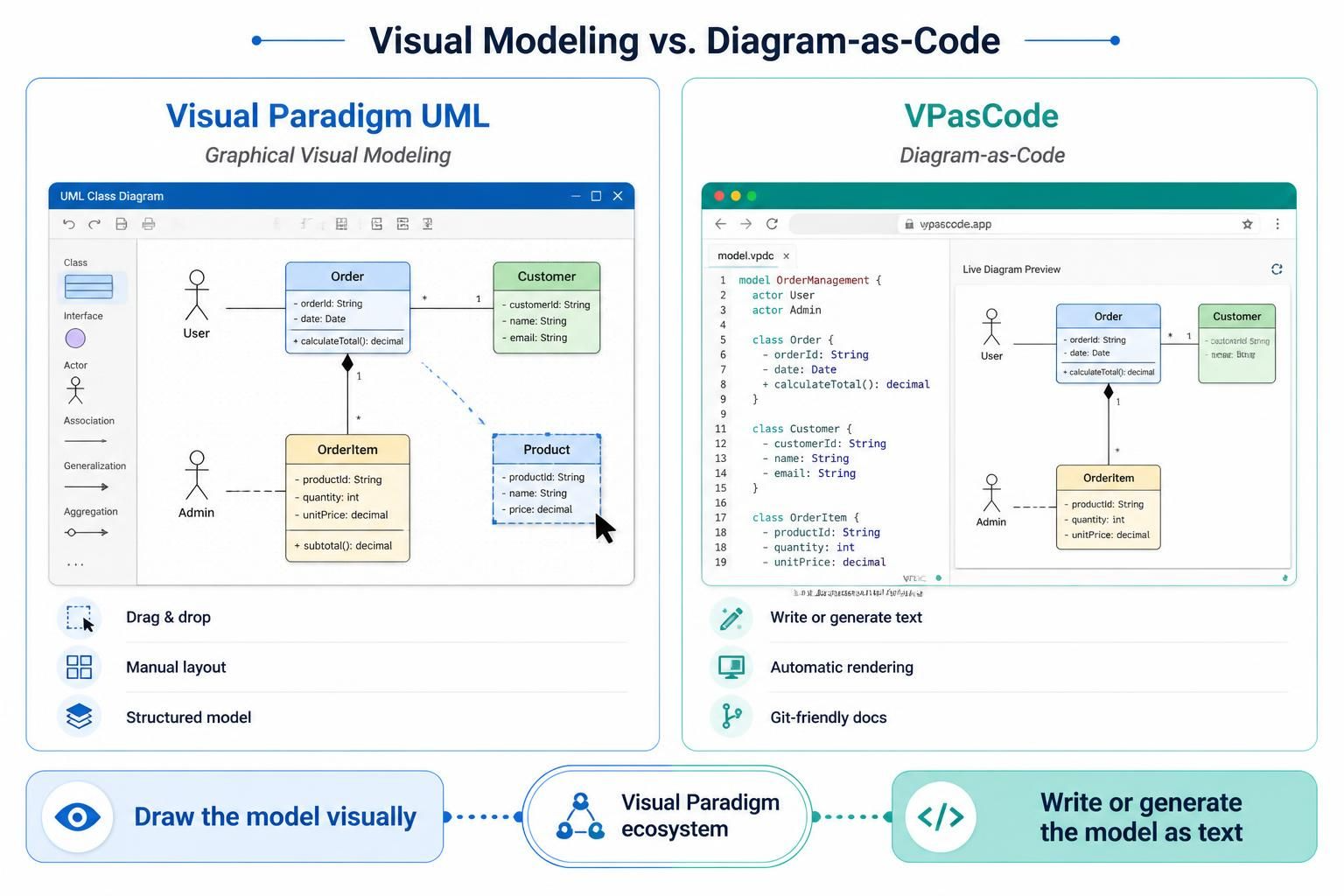
In the modern software development lifecycle, the method by which we capture system architecture has evolved. The image provided illustrates a critical fork in the road for system architects and developers: the choice between Visual Paradigm UML (Graphical Visual Modeling) and VPasCode (Diagram-as-Code). Both tools reside within the same ecosystem but cater to different working styles and technical requirements.
This tutorial explores the architectural differences between these two approaches, analyzing how they handle diagram construction, layout management, and integration into the development workflow.
1. Visual Paradigm UML: The Graphical Approach
Visual Paradigm UML represents the traditional, industry-standard approach to modeling. It is designed for users who prefer a visual, interactive environment to define system structures. As shown in the left panel of the reference diagram, this tool utilizes a GUI (Graphical User Interface) with a sidebar containing palette elements.
Core Workflow: Drag, Drop, and Connect
The primary interaction model in Visual Paradigm UML is manual arrangement. The user:
- Selects an Element: Chooses a class, actor, or interface from the sidebar (e.g., “Class,” “Actor,” “Association”).
- Drag & Drop: Places the element onto the canvas.
- Manual Layout: Physically moves the box to a specific coordinate to organize the diagram’s visual hierarchy.
- Connects Relationships: Draws lines (associations, generalizations, aggregations) to define how elements interact.
This approach is ideal for brainstorming sessions, architectural reviews where stakeholders need to see the “big picture” immediately, and for developers who find drawing diagrams more intuitive than writing code.
2. VPasCode: The Diagram-as-Code Approach
VPasCode introduces a paradigm shift by treating diagrams as text. Instead of clicking buttons to draw shapes, the user writes code that describes the diagram. The image demonstrates this via a split-screen interface where the left side is a code editor and the right side is the “Live Diagram Preview.”
Core Workflow: Write, Render, and Sync
The VPasCode workflow relies on text-based syntax (similar to PlantUML, Mermaid, or D2). The process follows these steps:
- Define Structure: The user writes code blocks to define objects. For example, defining a class looks like this:
class Order {
  - orderId: String
  - date: Date
  + calculateTotal(): decimal
}- Automatic Rendering: As the user types, the engine interprets the syntax and renders the visual representation in real-time.
- AI Assistance: Because the input is text, it is easy to integrate AI tools to generate boilerplate code for classes or actors.
- Git-Friendly: Since the diagram is just text, it can be version-controlled using Git, allowing for diff comparisons between versions.
3. Technical Comparison
To decide which tool fits your project needs, it is essential to understand the technical implications of each approach.
Modeling Concepts
Visual Paradigm UML excels at handling complex, non-linear relationships where visual proximity matters. It maintains a “Structured Model” where the relationships are stored in a database (repository), allowing for rigorous validation and round-trip engineering (generating code from the model).
VPasCode excels at rapid iteration. Changing a class name or adding a new attribute is as simple as editing a line of text. It is optimized for documentation that evolves alongside source code, making it perfect for agile environments where requirements change frequently.
The Ecosystem
Both tools share a common backend. This means you are not forced to choose one exclusively. You can use VPasCode to draft the initial structure of a diagram quickly, and then export or open it in Visual Paradigm UML to refine the layout and perform deep analysis.
Conclusion
The choice between Visual Paradigm UML and VPasCode ultimately depends on your personal working style and the nature of the project. If you prefer a tactile, visual approach where you “draw” your system, Visual Paradigm UML is the robust choice. If you prefer the speed and precision of coding, or if you want your diagrams to be part of your version-controlled codebase, VPasCode offers a modern, text-first solution.