

In today’s interconnected business environment, technical diagrams are not just visual aids; they are critical communication tools. Whether you are mapping a complex supply chain process or defining system architecture, the clarity of your diagrams determines the efficiency of your stakeholders. However, a significant barrier often exists: language. When a process map is created in English but needs to be reviewed by partners in Tokyo or Berlin, the friction of translation can delay projects and introduce errors.
This is where the embedded AI capabilities within Visual Paradigm VPasCode revolutionize the modeling experience. By consolidating powerful features like diagram generation, modification, and translation into a single, accessible interface, VPasCode allows professionals to maintain high productivity while breaking down language barriers.
The Challenge of Fragmented Workflows
Before the introduction of the unified AI Tools menu, accessing artificial intelligence features within the modeling environment was a fragmented experience. Users often found themselves toggling between different sections of the application interface. Generation features might be located in the main app bar, while modification and translation tools were tucked away near the code editor.
This dispersion created a cognitive load that interrupted the creative flow. Modelers had to memorize specific locations for each AI action, essentially breaking their concentration to find the right tool. This fragmentation was particularly detrimental when working on international projects where the speed of iteration is crucial.
The Solution: A Unified AI Hub
The introduction of the consolidated AI Tools drop-down menu addresses these pain points by centralizing all AI capabilities. This architectural update offers a streamlined approach to diagramming that benefits every stage of the workflow.
1. Reduced Cognitive Load
The primary benefit of the new interface is simplicity. Users no longer need to remember where specific features reside. With a single click on the AI Tools menu, the full spectrum of AI assistance is revealed. This “one-click” accessibility means you can switch from creating a diagram to modifying it or translating it without navigating complex menus.
2. Enhanced Discoverability
For new users or those less familiar with the tool’s depth, the unified menu serves as a roadmap. It immediately displays the full range of AI capabilities available, encouraging experimentation. Instead of missing out on features buried in sub-menus, users can see Generate, Modify, and Translate right at their fingertips.
3. Consistent Workflow
Consistency is key to productivity. Whether you are starting a project from scratch, iterating on an existing model, or preparing a document for an international review, the entry point remains the same. This consistency speeds up task switching and keeps the user immersed in the analytical work rather than the mechanics of the software.
Mastering the AI Tools Menu: Step-by-Step Usage
Getting started with the new unified interface is intuitive. Here is how you can leverage these tools effectively within your VPasCode workspace:
- Launch VPasCode: Open your browser and navigate to the VPasCode environment.
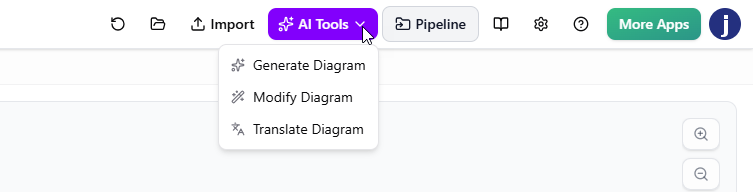
- Locate the App Bar: Look at the top of the workspace interface. You will see a prominent purple button labeled AI Tools.
- Open the Menu: Click on the AI Tools drop-down menu.
- Select Your Action: Choose the action that fits your current task:
- Generate Diagram: For creating new diagrams from scratch using natural language prompts.
- Modify Diagram: For refining or updating existing models based on specific requirements.
- Translate Diagram: For converting labels and descriptions into different languages while preserving structure.
Case Study: Global Supply Chain Collaboration
To understand the practical application of these tools, consider a scenario involving a detailed BPMN (Business Process Model and Notation) process map for a supply chain workflow. Let’s say you have created this map in English and need to share it with partners in Japan and Germany.
Without AI tools, you might have to manually re-create the diagram or use external translation tools that often break the visual structure of the diagram. With VPasCode’s Translate Diagram feature:
- You access the AI Tools menu.
- You select the Translate Diagram option.
- You specify the target language (e.g., Japanese or German).
The system automatically converts all text labels and descriptions into the target language. Crucially, it preserves the structural integrity of the visual. This ensures that non-English speaking stakeholders can fully understand the process without the risk of manual re-creation errors.
Why Centralization Matters: The Benefits
The consolidation of these tools offers several tangible benefits that translate directly into business value:
- Focused Productivity: By minimizing the time spent searching for tools, professionals can stay immersed in their analytical and creative work.
- Global Inclusivity: It ensures that technical documentation is accessible to stakeholders regardless of their native language.
- Agile Iteration: The ability to quickly modify or regenerate diagrams allows teams to adapt to changes in real-time.
Technical Architecture of Diagram Translation
Understanding how the translation feature works at a high level can help users trust the output. When you initiate a translation:
1. Text Extraction: The AI engine parses the diagram structure to identify all text elements (labels, notes, descriptions).
2. Context Preservation: Unlike simple copy-paste translation, the AI analyzes the semantic context of the text within the diagram structure.
3. Structural Integrity Check: The engine ensures that text replacements do not break layout constraints or overlap with other elements.
4. Rendering: The translated text is rendered back into the original diagram format, maintaining the visual hierarchy.
This process allows for a seamless transition from a domestic process map to an international deliverable.
Conclusion
The evolution of VPasCode’s AI tools represents a shift towards more inclusive, efficient, and user-centric modeling. By unifying generation, modification, and translation into a single, accessible menu, Visual Paradigm ensures that AI assistance is always just a click away. Whether you are building a system from scratch or collaborating with a global team, these tools empower you to focus on the logic and value of your diagrams rather than the mechanics of creating them.